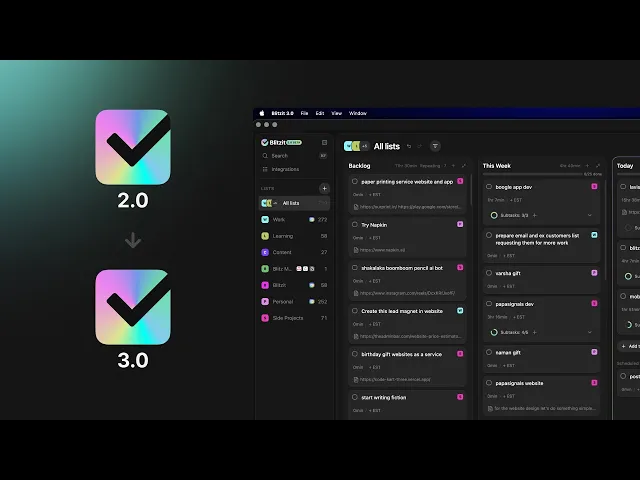
Blitzit 3.0 is a completely rebuilt version of Blitzit with a new system and database. Because of this, your existing Blitzit v2.x lists and tasks need to be migrated before they appear in 3.0.
Your existing data is safe and has not been deleted. Migration copies your selected data into Blitzit 3.0 while your original v2.x workspace remains unchanged.
Blitzit 3.0 is currently in beta and was initially rolled out to a small group of users through our Discord community so we can find issues, collect feedback, and improve stability before the wider rollout. We’re actively fixing migration issues and bugs reported by users.
We recommend setting up Blitzit 3.0 on desktop first and migrating your existing data before using the 3.0 mobile app.
Download Blitzit 3.0
Before you migrate
Make sure you sign up for Blitzit 3.0 using the email address connected to your existing Blitzit v2.x account.
Blitzit uses this email address to find your old workspace and determine whether there is data available to migrate.
If you use a different email address, Blitzit 3.0 may not find your existing data.
We recommend doing the migration from the Blitzit 3.0 desktop app on Mac, Windows, or Linux before using the new mobile app 3.x.
How to migrate your data
Open Blitzit 3.0 on your computer.
Click your profile avatar in the bottom left.
Open Account and scroll down to the Migration section.
Wait while Blitzit checks your old Blitzit workspace.
Once your workspace is found, click Migrate Data. Blitzit will show the lists and tasks available in your old workspace.
Review the data before importing. You can click into the lists and task information to see what will be brought over.
Select the lists you want to migrate. Everything is selected by default.
Click Import Selected.
Give Blitzit some time to import and sync your data.
You can click View progress while the migration is running. You can also close the migration window and continue using Blitzit while the import continues in the background.
Once the migration finishes, check your sidebar and lists to make sure your lists and tasks have appeared correctly.
Frequently asked questions
What happens after migration?
Your Blitzit 2.x workspace remains unchanged.
The migration brings your selected data into Blitzit 3.0. It does not turn Blitzit v2.x and Blitzit 3.0 into two versions of the same live database.
You can therefore keep both apps installed and use them during the transition.
However, changes made in Blitzit 3.0 do not sync back to Blitzit v2.x. For example, completing a task in 3.0 will not mark that task as completed in v2.x.
Blitzit 3.0 is the version we’re moving forward with. The older app will remain useful during the transition while we continue improving 3.0 and fixing issues found during beta.
I added more things to Blitzit v2.x after migrating. Can I import them?
Yes.
Go back to Profile avatar → Account → Migration
Then click Check for updates. Blitzit will check your old workspace again. Lists that have already been imported will appear under Already imported section, making it easier to see what has already been brought across and whether anything new is available.
You can review the data and import additional items.
How do I check whether everything migrated?
There are a few ways to check.
After the migration completes, look at the lists in the Blitzit 3.0 sidebar and compare them with your old workspace.
You can also return to Account → Migration → Review data. Previously migrated lists are shown under Already imported section.
Inside the migration window, you can review the lists and their task information before and after importing.
If a list appears but some of its tasks are missing, contact us. Don’t delete the original data from Blitzit v2.x while we investigate.
Is my old Blitzit data deleted when I migrate?
NO.
Migration does not delete your Blitzit v2.x data. Your old workspace remains unchanged.
Blitzit 3.0 uses a separate database, and migration brings your selected data from the old system into the new one.
I installed Blitzit 3.0 and all my tasks are gone. Did I lose them?
Most likely, no.
If you haven’t migrated yet, your lists and tasks are still in your previous Blitzit workspace. They simply won’t automatically appear in 3.0 because the two versions use separate databases.
Complete the migration from the Blitzit 3.0 desktop app first.
Why doesn’t my old data automatically appear in 3.0?
Blitzit 3.0 is a rebuilt app with a new backend and database. Your Blitzit v2.x data therefore needs to be migrated into the new system before it appears in 3.0.
Can I choose what gets migrated?
Yes. Click Choose what to import and review the available lists before starting the migration.
Everything is selected by default, but you can choose what you want to bring over.
Can I review my tasks and lists before importing?
Yes. The migration window shows the lists available from your old workspace along with their task information. You can review this before starting the import.
How long does migration take?
It depends on how much data you have. A workspace containing hundreds or thousands of tasks can take longer, so don’t worry if everything doesn’t appear immediately.
Let the migration finish syncing before checking the final result.
Do I have to keep the migration window open?
No. Once the import is running, you can continue using Blitzit 3.0 while it completes in the background.
You can return to the Migration section and use View progress to check its status.
Can I use Blitzit v2.x and 3.0 at the same time?
Yes. You can keep both desktop apps installed during the transition.
Just remember that they use separate systems. They are not continuously synced with each other.
If I complete a task in 3.0, will it be completed in v2.x?
No. Changes made in Blitzit 3.0 do not sync back to Blitzit v2.x.
Migration is designed to bring your old data into 3.0, not maintain two-way synchronization between the old and new apps.
I continued using Blitzit v2.x after migrating. Can I bring the newer data into 3.0?
Yes. Open Account → Migration again and check for updates.
Previously imported lists will be identified, and you can review whether newer data is available to bring across.
Should I use Blitzit v2.x or Blitzit 3.0?
We recommend moving to Blitzit 3.0. 3.0 is the version we’re actively building for the future, but it is currently in beta, so there are still improvements and bug fixes being made.
You can keep the older desktop app installed alongside 3.0 during this transition if you need it.
What happens to the old Blitzit app?
Blitzit 3.0 will become the main version of Blitzit once it is stable and ready for everyone.
For now, the previous desktop version can still be used alongside 3.0 while we finish the transition.
I updated the mobile app and can’t see my old data. What should I do?
The latest mobile app is built for Blitzit 3.0 and uses the new Blitzit 3.0 backend.
Your old Blitzit data will not automatically appear there.
Set up Blitzit 3.0 on Mac, Windows, or Linux, migrate your old data, and then sign into the mobile app with the same Blitzit 3.0 account. Your migrated data should then be available on mobile.
Can I go back to the previous iOS version?
Unfortunately, we cannot currently provide the previous iOS version.
Apple has closed the older Blitzit version/build for new TestFlight submissions, and because a newer version has already been approved, we cannot simply re-upload the previous version through TestFlight.
For iOS users, the path forward is therefore to use the latest Blitzit mobile app and migrate the old Blitzit data into 3.0 using the desktop app.
What about Android users who want the previous version?
Android users can be provided with the APK for the previous version 1.6.2 if they need to continue using it during the transition.
However, we recommend migrating to Blitzit 3.0.
My paid or Lifetime plan isn’t showing in Blitzit 3.0. Do I need to buy it again?
No. Please do not purchase the plan again. Your existing purchase is still valid.
Your plan may not appear correctly in 3.0 if:
You updated the mobile app before opening Blitzit 3.0 on desktop and completing the migration.
You created your Blitzit 3.0 account using a different email address from the one associated with your existing purchase.
Please first set up Blitzit 3.0 on desktop and complete the migration. Make sure you’re using the account associated with your existing Blitzit purchase.
If your paid or Lifetime plan still doesn’t appear, contact us and share the email address associated with your purchase and the email you’re using for Blitzit 3.0.
We’ll verify your purchase and correct your plan status.
My migration says my old plan exists but no active Stripe subscription was found. What should I do?
Don’t purchase another plan.
This can happen when the plan information in the old Blitzit account doesn’t match an active Stripe subscription. Contact Blitzit support and we’ll check the account manually.
An archived list migrated, but the tasks inside it didn’t. What should I do?
This is an issue we’re aware can occur with some migration data.
Keep the original data in Blitzit v2.x and contact us with the affected list. We’ll investigate the migration issue and provide the correct resolution.
What happens to my recurring and scheduled tasks after migration?
Recurring and scheduled tasks work differently in Blitzit 3.0, so there are a few important things to know when migrating them from v2.x.
When you migrate, your recurring task rules and their existing generated tasks are moved to 3.0. For example, the recurring task itself may appear in your Backlog, while tasks it has already generated may appear in Today or This Week.
Once migrated, these tasks are now managed by Blitzit 3.0. Future occurrences will be generated by the 3.0 scheduling system.
There is no two way sync between Blitzit v2.x and 3.0. This means if you continue using a recurring task in v2.x after migration, v2.x may generate another copy the next hour/day, but that new copy will not automatically appear in 3.0.
We recommend managing migrated recurring and scheduled tasks from 3.0 only to avoid duplicate or inconsistent tasks.
If a schedule itself changes during migration, for example a custom recurring schedule unexpectedly becomes a daily task, please report it to us. That is not expected behaviour and we’ll investigate it.
The migration finished but says 0 tasks or 0 lists were imported.
First, check your Blitzit 3.0 sidebar and Account → Migration.
If your lists appear under Already imported, the data may already have been imported and there was simply nothing new to bring over during that particular import.
If the data is actually missing, contact support before attempting anything destructive in either app.
Should I delete Blitzit v2.x after migrating?
There is no need to delete it immediately.
We recommend first checking that the lists and tasks you need are available correctly in Blitzit 3.0.
You can keep both apps installed during the transition or until official flagship release in 2027.
Should I delete my old lists after migration?
We recommend keeping your old Blitzit v2.x data for now, especially while 3.0 is still in beta.
Migration does not require you to delete anything from the old system.
What should I do if something is missing or incorrect after migration?
Blitzit 3.0 is currently in beta, and we’re actively fixing migration issues and other bugs reported by users.
If something doesn’t look right, please don’t repurchase your plan or manually recreate a large amount of missing data before contacting us. Your original Blitzit v2.x data remains unchanged during migration.
When reporting an issue, please share:
The email address you used for Blitzit v2.x
The email address you’re using for Blitzit 3.0, especially if they are different
Which lists, tasks, or other data are missing or incorrect
What you expected to see and what appeared in 3.0 instead
For plan or purchase issues, we may also ask for your Stripe invoice, receipt, or other proof of purchase
Sometimes a plan was purchased using a different email address from the one used to create your Blitzit account. That’s completely fine. Sharing both email addresses and your purchase proof helps us locate the correct purchase and fix your account faster.
You can reach the Blitzit team through Crisp chat on our website, email support, or by tagging one of the moderators in our Discord community.
Most importantly, migration does not delete or change your Blitzit v2.x data. If something is missing or looks incorrect in 3.0, contact us first so we can check what happened during the migration.