Time By List
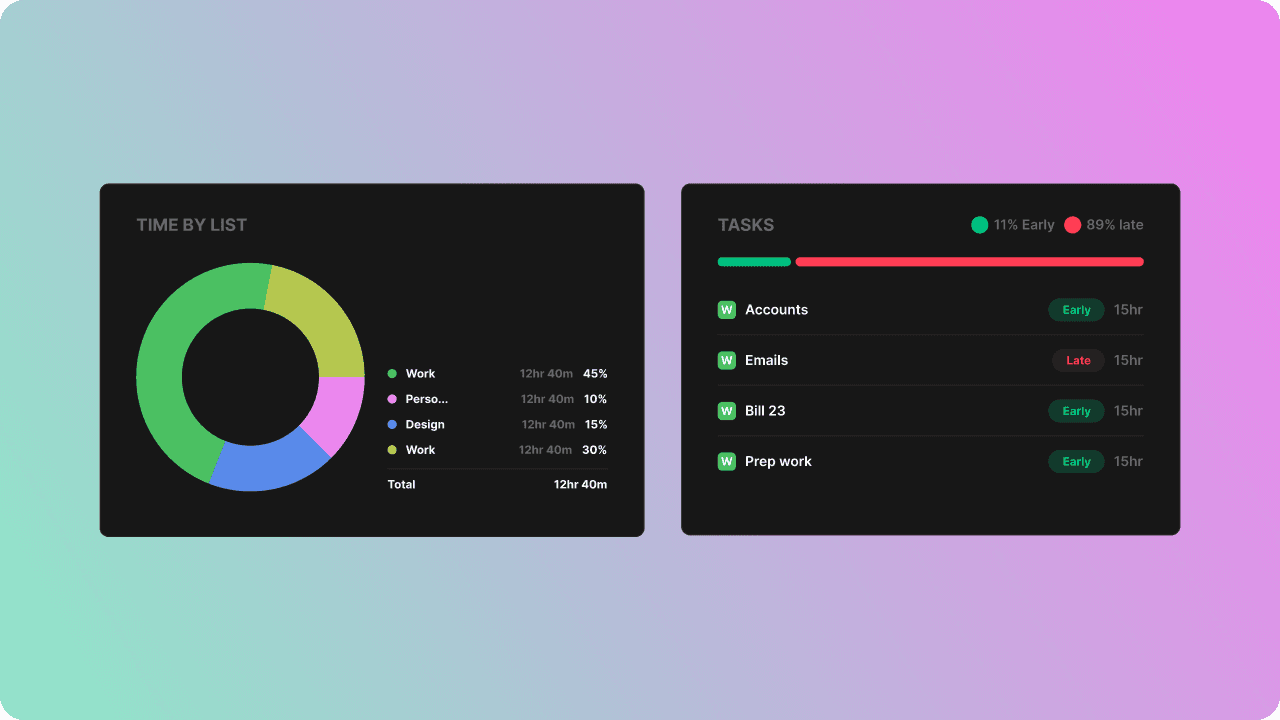
This section breaks down your total work time by List, making it easy to see where you’re investing most of your effort.
Each segment of the chart represents the total time spent on tasks within that list during the selected date range.
Use this insight to understand which areas of work dominate your schedule and where you may need to rebalance.

Completion Insights
This section shows how you completed your tasks during the selected period, including whether you finished early or late and how much time you spent on each task.
Punctuality Graph
This graph shows the percentage of your task time that was completed early versus late.
For example, if you spent 15 hours finishing tasks early and 5 hours finishing them late, the graph will display 75% early / 25% late.
This helps you understand how accurately you estimate your tasks and whether your planning is improving over time.
Done Tasks
This section shows all tasks you completed in the selected period.
For each task, you’ll see:
The date you completed it
Whether you finished early or late (only if the task had an EST)
The Time Taken, which reflects your actual working time on that task
Tasks without an EST will not display early/late indicators but will still show their Time Taken value.
