|

Akiflow vs Blitzit | Time Blocking vs Focused Execution | 2026 Comparison

Akiflow vs Blitzit | Time Blocking vs Focused Execution | 2026 Comparison

Akiflow offers advanced time blocking and universal inbox for power users. Blitzit delivers focused execution with live timers. Find your productivity fit.

Akiflow offers advanced time blocking and universal inbox for power users. Blitzit delivers focused execution with live timers. Find your productivity fit.

Akiflow excels at time blocking and calendar management. Blitzit helps you execute with focus.

Akiflow is a premium time-blocking tool that combines task management with calendar control. It helps power users schedule their entire day with precision and pull tasks from multiple sources.

But once you've blocked your time, you still need to do the work.

That's where Blitzit comes in.

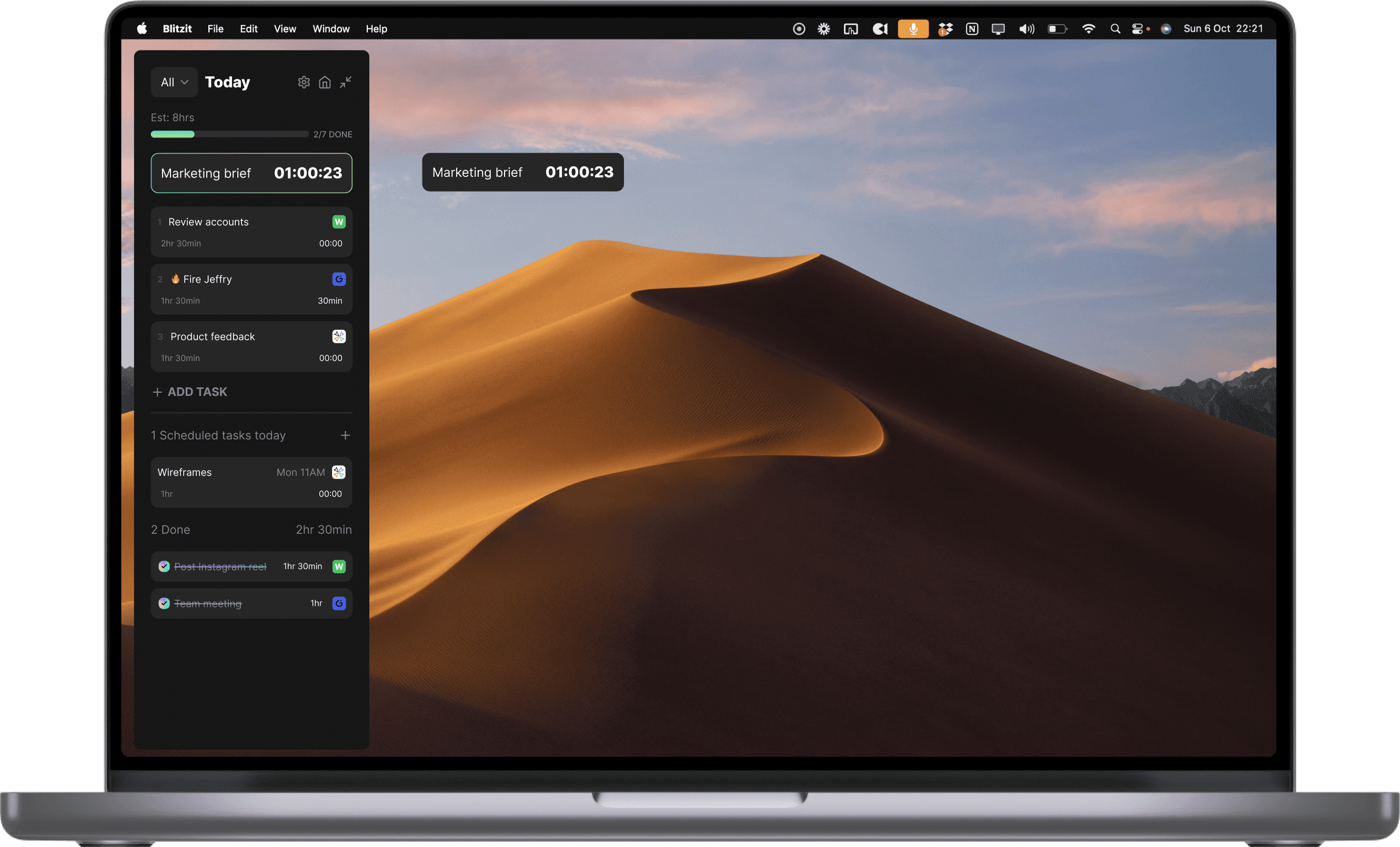
Here's what makes Blitzit different: Your today's tasks live in a side panel that's always visible while you work. When you're ready to focus, collapse that panel into just the live task with its timer, always visible on screen. From there you can add notes, voice memos, manage subtasks, take breaks, or mark tasks done. No friction, no context switching, just flow.
Benefits of Akiflow

If you want a tool that offers advanced time blocking, a universal inbox for tasks, and deep calendar control, Akiflow is a powerful choice for productivity enthusiasts.

Advanced Time Blocking

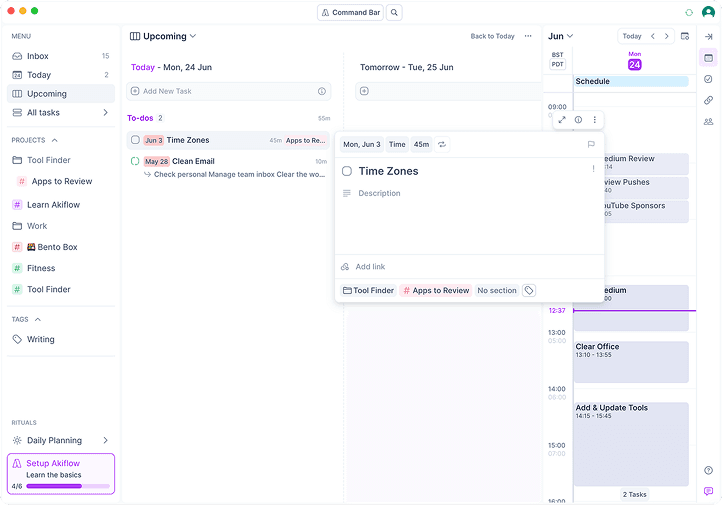
Akiflow's time-blocking is best-in-class. Drag tasks directly onto your calendar, allocate specific time slots, and see exactly how your day will unfold.

Shortcuts

Akiflow's time-blocking is best-in-class. Drag tasks directly onto your calendar, allocate specific time slots, and see exactly how your day will unfold.

Advanced Time Blocking

Akiflow's time-blocking is best-in-class. Drag tasks directly onto your calendar, allocate specific time slots, and see exactly how your day will unfold.

Universal Inbox

Pull tasks from Gmail, Slack, Todoist, Asana, Notion, Linear, and more into one unified inbox. Triage everything in one place before scheduling.

Shortcuts

Pull tasks from Gmail, Slack, Todoist, Asana, Notion, Linear, and more into one unified inbox. Triage everything in one place before scheduling.

Universal Inbox

Pull tasks from Gmail, Slack, Todoist, Asana, Notion, Linear, and more into one unified inbox. Triage everything in one place before scheduling.

Keyboard-First Design

Built for power users who hate touching their mouse. Akiflow's command bar and keyboard shortcuts let you manage your entire day without leaving the keyboard.

Shortcuts

Built for power users who hate touching their mouse. Akiflow's command bar and keyboard shortcuts let you manage your entire day without leaving the keyboard.

Keyboard-First Design

Built for power users who hate touching their mouse. Akiflow's command bar and keyboard shortcuts let you manage your entire day without leaving the keyboard.

Benefits of Blitzit

Blitzit turns your tasks into an actionable, prioritised to-do list and it's also designed to complement apps like Akiflow, helping you turn time-blocked tasks into focused momentum.
Blitz Mode & Focus Mode

Akiflow excels at time blocking and scheduling tasks into your calendar, but when it's time to actually do the work, you need execution power. Blitzit turns your daily priorities into a clear, actionable list. And with Focus Mode, that list collapses into a sleek, always-visible floating timer, helping you stay focused on the task at hand.

Shortcuts

Akiflow excels at time blocking and scheduling tasks into your calendar, but when it's time to actually do the work, you need execution power. Blitzit turns your daily priorities into a clear, actionable list. And with Focus Mode, that list collapses into a sleek, always-visible floating timer, helping you stay focused on the task at hand.

Blitz Mode & Focus Mode

Akiflow excels at time blocking and scheduling tasks into your calendar, but when it's time to actually do the work, you need execution power. Blitzit turns your daily priorities into a clear, actionable list. And with Focus Mode, that list collapses into a sleek, always-visible floating timer, helping you stay focused on the task at hand.

Live Time Tracking

Akiflow tracks durations after the fact. Blitzit keeps you accountable in the moment. Every task comes with a live timer, helping you measure focus sessions and build time management habits as you work, not after.

Shortcuts

Akiflow tracks durations after the fact. Blitzit keeps you accountable in the moment. Every task comes with a live timer, helping you measure focus sessions and build time management habits as you work, not after.

Live Time Tracking

Akiflow tracks durations after the fact. Blitzit keeps you accountable in the moment. Every task comes with a live timer, helping you measure focus sessions and build time management habits as you work, not after.

Minimalist Simplicity

Akiflow is built for power users with command bars and keyboard shortcuts. Blitzit is built for focus. A clean, distraction-free interface that helps you do the work without feature overload or decision fatigue.

Shortcuts

Akiflow is built for power users with command bars and keyboard shortcuts. Blitzit is built for focus. A clean, distraction-free interface that helps you do the work without feature overload or decision fatigue.

Minimalist Simplicity

Akiflow is built for power users with command bars and keyboard shortcuts. Blitzit is built for focus. A clean, distraction-free interface that helps you do the work without feature overload or decision fatigue.

Time to remove distraction, focus on what matters, and

get things done.

Time to remove distraction, focus on what matters, and

get things done.

Time to remove distraction,
focus on what matters, and

get things done.

Akiflow vs Blitzit comparison showdown

Feature

Blitzit

Akiflow

Best For

Deep focus and task execution

Time blocking and calendar management

Primary Use Case

Daily workflow and flow state focus

Scheduling and task consolidation

Core Experience

Side panel of tasks that collapses into floating focus timer

Calendar-centric time blocking interface

Time Tracking

Built-in live timer with Pomodoro, Countdown, or Simple Tracking

Duration tracking, not live timers

Focus Tools

Focus Mode and Blitz Mode

No dedicated focus mode

Time Blocking

Via Google Calendar integration

Best-in-class time blocking

Universal Inbox

Focused on execution

Pull tasks from 20+ sources

Calendar Integration

Google Calendar (live)

Deep Google and Outlook integration

Gamification

Satisfying task celebrations and streaks

Limited motivational features

Integrations

Notion and Google Calendar (live). ClickUp, Slack, Claude MCP, ChatGPT MCP coming soon

20+ integrations including Todoist, Asana, Linear

Pricing

One-time lifetime deal with affordable monthly options

$15/month ($180/year). Premium pricing.

Keyboard Shortcuts

Basic shortcuts

Command bar, keyboard-first design

Team Collaboration

Built for personal productivity

Personal productivity focused

Visual Interface

Clean, minimalist, low distraction

Calendar-centric, power-user focused

Reports

Detailed productivity charts and time spent on lists

Time analytics and insights

Mobile Apps

iOS and Android apps available

iOS and Android apps available

Why Blitzit Stands Out

For professionals and students who crave clarity, momentum, and focus, Blitzit delivers an execution system designed for how modern work actually feels.

Designed for Focused Execution

Akiflow excels at scheduling tasks. Blitzit helps you do the work. Your tasks stay visible in a side panel while you work, and when you're ready to focus, everything collapses into a floating timer that keeps you locked in.

Live Time Tracking Built In

Akiflow tracks durations after the fact. Blitzit keeps you accountable in the moment with live countdown timers, Pomodoro mode, or simple tracking. All built-in.

Blitz Mode for Instant Momentum

Start your day with a single click. Blitz Mode launches you into your first task with a live countdown and clear focus. No complex scheduling required.

Gamified Motivation That Feels Good

Every task you complete triggers satisfying visual feedback. Streaks and celebratory GIFs make productivity feel rewarding, not just effective.

Minimalist UX

Blitzit's interface is simple and distraction-free. No overwhelming calendar views or complex scheduling. Every element serves flow.

Insightful Reports

Blitzit tracks your completed tasks and time spent automatically. Simple, visual reports show where your time goes so you can improve how you work.

Lifetime Deal Pricing

No subscriptions. One payment. Blitzit delivers premium productivity tools at a fraction of Akiflow's $180/year pricing.

When Akiflow Might Be Better

Blitzit excels at execution. But Akiflow is a strong choice for power users who need advanced time blocking and task consolidation.

Best-in-Class Time Blocking

If your productivity depends on precise calendar control and scheduling tasks into specific time slots, Akiflow is hard to beat.

Universal Inbox

Pull tasks from Gmail, Slack, Todoist, Asana, Notion, Linear, and more. Triage everything in one place before scheduling.

Keyboard-First Design

Built for power users who want to manage their entire day without touching a mouse. Command bar and shortcuts for everything.

Time Analytics

Review how you spent your time with detailed insights and reporting on scheduled vs. actual work.

Not Sure Which One Is Right for You?

Ask yourself these questions:

Do I need advanced time blocking and calendar control, or focused execution with live timers?

Do I pull tasks from many different sources and need a universal inbox?

Is live time tracking during execution important to my workflow?

Do I want a one-time purchase or am I comfortable with $15/month premium pricing?

Do I prefer keyboard-first, power-user interfaces, or minimalist simplicity?

The Bottom Line

Choosing between Blitzit and Akiflow isn't about which tool has more features. It's about choosing the one that fits how you work.

If you want a focused daily execution system that helps you stay on task, in flow, and in control, Blitzit is a powerful and beautifully simple choice.

If you need advanced time blocking, a universal inbox for tasks, and keyboard-first power-user features, Akiflow offers a premium, calendar-centric approach.

Here's the thing though. You don't have to choose just one. Some professionals schedule in Akiflow and execute in Blitzit, using them together to bridge planning and action. You can connect the two by syncing your scheduled tasks through Google Calendar, then using Blitzit's Focus Mode to power through your time blocks.

Ready to Try Blitzit?

Start free today and get access to Blitzit's 20% off Lifetime Deal while it's still available.

Why Blitzit Stands Out

For professionals and students who crave clarity, momentum, and focus, Blitzit delivers an execution system designed for how modern work actually feels.

Designed for Focused Execution

Akiflow excels at scheduling tasks. Blitzit helps you do the work. Your tasks stay visible in a side panel while you work, and when you're ready to focus, everything collapses into a floating timer that keeps you locked in.

Live Time Tracking Built In

Akiflow tracks durations after the fact. Blitzit keeps you accountable in the moment with live countdown timers, Pomodoro mode, or simple tracking. All built-in.

Blitz Mode for Instant Momentum

Start your day with a single click. Blitz Mode launches you into your first task with a live countdown and clear focus. No complex scheduling required.

Gamified Motivation That Feels Good

Every task you complete triggers satisfying visual feedback. Streaks and celebratory GIFs make productivity feel rewarding, not just effective.

Minimalist UX

Blitzit's interface is simple and distraction-free. No overwhelming calendar views or complex scheduling. Every element serves flow.

Insightful Reports

Blitzit tracks your completed tasks and time spent automatically. Simple, visual reports show where your time goes so you can improve how you work.

Lifetime Deal Pricing

No subscriptions. One payment. Blitzit delivers premium productivity tools at a fraction of Akiflow's $180/year pricing.

When Akiflow Might Be Better

Blitzit excels at execution. But Akiflow is a strong choice for power users who need advanced time blocking and task consolidation.

Best-in-Class Time Blocking

If your productivity depends on precise calendar control and scheduling tasks into specific time slots, Akiflow is hard to beat.

Universal Inbox

Pull tasks from Gmail, Slack, Todoist, Asana, Notion, Linear, and more. Triage everything in one place before scheduling.

Keyboard-First Design

Built for power users who want to manage their entire day without touching a mouse. Command bar and shortcuts for everything.

Time Analytics

Review how you spent your time with detailed insights and reporting on scheduled vs. actual work.

Not Sure Which One Is Right for You?

Ask yourself these questions:

Do I need advanced time blocking and calendar control, or focused execution with live timers?

Do I pull tasks from many different sources and need a universal inbox?

Is live time tracking during execution important to my workflow?

Do I want a one-time purchase or am I comfortable with $15/month premium pricing?

Do I prefer keyboard-first, power-user interfaces, or minimalist simplicity?

The Bottom Line

Choosing between Blitzit and Akiflow isn't about which tool has more features. It's about choosing the one that fits how you work.

If you want a focused daily execution system that helps you stay on task, in flow, and in control, Blitzit is a powerful and beautifully simple choice.

If you need advanced time blocking, a universal inbox for tasks, and keyboard-first power-user features, Akiflow offers a premium, calendar-centric approach.

Here's the thing though. You don't have to choose just one. Some professionals schedule in Akiflow and execute in Blitzit, using them together to bridge planning and action. You can connect the two by syncing your scheduled tasks through Google Calendar, then using Blitzit's Focus Mode to power through your time blocks.

Ready to Try Blitzit?

Start free today and get access to Blitzit's 20% off Lifetime Deal while it's still available.

Why Blitzit Stands Out

For professionals and students who crave clarity, momentum, and focus, Blitzit delivers an execution system designed for how modern work actually feels.

Designed for Focused Execution

Akiflow excels at scheduling tasks. Blitzit helps you do the work. Your tasks stay visible in a side panel while you work, and when you're ready to focus, everything collapses into a floating timer that keeps you locked in.

Live Time Tracking Built In

Akiflow tracks durations after the fact. Blitzit keeps you accountable in the moment with live countdown timers, Pomodoro mode, or simple tracking. All built-in.

Blitz Mode for Instant Momentum

Start your day with a single click. Blitz Mode launches you into your first task with a live countdown and clear focus. No complex scheduling required.

Gamified Motivation That Feels Good

Every task you complete triggers satisfying visual feedback. Streaks and celebratory GIFs make productivity feel rewarding, not just effective.

Minimalist UX

Blitzit's interface is simple and distraction-free. No overwhelming calendar views or complex scheduling. Every element serves flow.

Insightful Reports

Blitzit tracks your completed tasks and time spent automatically. Simple, visual reports show where your time goes so you can improve how you work.

Lifetime Deal Pricing

No subscriptions. One payment. Blitzit delivers premium productivity tools at a fraction of Akiflow's $180/year pricing.

When Akiflow Might Be Better

Blitzit excels at execution. But Akiflow is a strong choice for power users who need advanced time blocking and task consolidation.

Best-in-Class Time Blocking

If your productivity depends on precise calendar control and scheduling tasks into specific time slots, Akiflow is hard to beat.

Universal Inbox

Pull tasks from Gmail, Slack, Todoist, Asana, Notion, Linear, and more. Triage everything in one place before scheduling.

Keyboard-First Design

Built for power users who want to manage their entire day without touching a mouse. Command bar and shortcuts for everything.

Time Analytics

Review how you spent your time with detailed insights and reporting on scheduled vs. actual work.

Not Sure Which One Is Right for You?

Ask yourself these questions:

Do I need advanced time blocking and calendar control, or focused execution with live timers?

Do I pull tasks from many different sources and need a universal inbox?

Is live time tracking during execution important to my workflow?

Do I want a one-time purchase or am I comfortable with $15/month premium pricing?

Do I prefer keyboard-first, power-user interfaces, or minimalist simplicity?

The Bottom Line

Choosing between Blitzit and Akiflow isn't about which tool has more features. It's about choosing the one that fits how you work.

If you want a focused daily execution system that helps you stay on task, in flow, and in control, Blitzit is a powerful and beautifully simple choice.

If you need advanced time blocking, a universal inbox for tasks, and keyboard-first power-user features, Akiflow offers a premium, calendar-centric approach.

Here's the thing though. You don't have to choose just one. Some professionals schedule in Akiflow and execute in Blitzit, using them together to bridge planning and action. You can connect the two by syncing your scheduled tasks through Google Calendar, then using Blitzit's Focus Mode to power through your time blocks.

Ready to Try Blitzit?

Start free today and get access to Blitzit's 20% off Lifetime Deal while it's still available.