
How to Stay Focused When Working From Home

How to Stay Focused When Working From Home

How to Stay Focused When Working From Home

Written by

Blitzit Team

Published

Jan 8, 2026

Working from home can be convenient, but staying focused is a challenge for many. Distractions like smartphones, household interruptions, and blurred boundaries between work and personal time make it harder to stay productive. Here's how you can take control:

  • Create a Dedicated Workspace: Set up a specific area for work to boost focus and productivity. Avoid working from beds or couches.

  • Build Routines: Start your day with a morning ritual, define work hours, and create an end-of-day routine to separate work from personal life.

  • Use Tools like Blitzit: Manage tasks, track time, and work in focused intervals using productivity tools.

  • Limit Distractions: Keep your phone out of reach, schedule email checks, and use apps to block distracting websites.

  • Take Breaks: Regular short breaks, especially with physical activity, help maintain focus and energy.

How to Focus While Working From Home | Expert Videos
Set Up a Dedicated Workspace

Repeating daily habits in the same location helps train your brain for work. When you consistently work from a specific spot, your mind starts associating that space with productivity. Authors Steve Magness and Brad Stulberg explain it well:

"When we repeatedly execute the same routine and work in the same environment, we create strong links deep inside our brain and body... Essentially, we condition ourselves to work".

This kind of mental conditioning is why having a dedicated workspace is so effective. It helps reestablish physical boundaries that might have disappeared when your commute was replaced with a short walk to your desk. The key is choosing a location that supports your focus and work mindset.

Pick the Right Spot

Look around your home for a quiet area that’s removed from busy household zones. Kitchens, hallways, and shared living spaces can be full of distractions. If you have a spare room, that’s ideal. If not, carve out a dedicated corner in your bedroom or basement. Avoid working from beds or couches - they’re too strongly associated with relaxation, which can make it harder to stay focused.

Good natural lighting is a bonus, so try to set up near a window. Position your desk to face a wall or the window itself to limit distractions. Make sure the space has enough electrical outlets and a reliable internet connection, whether through WiFi or Ethernet. If noise is a problem, consider adding sound-dampening elements like rugs, thick curtains, or even a solid-core door.

Make Your Workspace Comfortable

Comfort and ergonomics go hand in hand when setting up a workspace. If possible, invest in an ergonomic chair with adjustable lumbar support and armrests. Your feet should rest flat on the floor, and your elbows should form a 90-degree angle while typing. Poor workspace setups are a major contributor to neck and back pain, which affects at least 25% of American adults at some point.

Position your monitor at eye level so you’re looking straight ahead rather than tilting your chin up or down. If you’re using a laptop, consider a stand and an external keyboard to create a more ergonomic setup. Some companies offer equipment stipends, often between $500 and $1,000, so check if yours does.

For lighting, add a desk lamp if natural light isn’t enough, and keep your workspace organized with storage solutions to reduce clutter. To avoid stiffness, set a timer to stand and stretch every 30 to 60 minutes. These small breaks can help keep your body active and engaged throughout the day.

Build Daily Routines and Set Boundaries

Once you've set up your dedicated workspace, the next step is to establish daily routines that separate work time from personal time. Without a commute or fixed office hours, it's easy for the lines between work and life to blur. A structured routine - starting with a defined morning ritual and clear work hours - can help you stay productive and maintain balance.

Begin with a Morning Routine

Starting your day with intention can make a world of difference. The way you spend your first hour often shapes the rest of your day. Instead of jumping straight from bed to your laptop, take this time to prepare yourself mentally and physically for the tasks ahead.

Begin by drinking a glass of water to rehydrate and wake up your system. Then, change out of your pajamas into comfortable but work-appropriate clothes - this small habit signals to your brain that it's time to get into work mode.

Incorporate movement into your morning. Spend 15–20 minutes on light exercise, whether that's stretching, yoga, or a quick walk. Physical activity not only lifts your mood by releasing endorphins but also sharpens your focus before you even sit down at your desk.

Before diving into your tasks, take a moment to review your day. Identify your "Big Three" priorities - those key tasks that must get done - and consider adding a calming activity like meditation to ground yourself. As Stephen Covey famously said:

"The key is not to prioritize what's on your schedule, but to schedule your priorities".

Define Your Work Hours

Sticking to specific start and end times is crucial for avoiding the trap of being "always on." Treat your remote work schedule like a traditional office job. For example, if you start at 9:00 AM, make it a point to log off by 5:00 PM.

At the end of your workday, develop a simple routine to signal the transition to personal time. This might include tidying up your workspace, reviewing your tasks for the next day, and shutting down your work devices. These small actions help you mentally shift from work mode to relaxation mode.

Remember, the goal is to focus on results, not just the hours you log. Tools like time trackers can help you manage your productivity and ensure you're making the most of your set hours.

Tell Others About Your Schedule

Clear communication about your schedule is essential for minimizing interruptions and setting expectations. Let your family, housemates, and colleagues know your work hours. Update your email signature and digital status to reflect when you're available, and use your calendar to block out time for focused work, breaks, and your end-of-day cutoff.

This transparency not only helps others respect your boundaries but also prevents colleagues from scheduling meetings during your most productive hours. Physical cues, like closing your office door or wearing headphones, can further signal when you're in work mode.

Equally important is disconnecting when your workday ends. Turn off notifications for work apps like Slack and email to protect your personal time. By sticking to these routines and boundaries, you'll not only boost your productivity during the day but also enjoy guilt-free downtime in the evenings.

Use Blitzit for Task Management and Focus
Blitzit

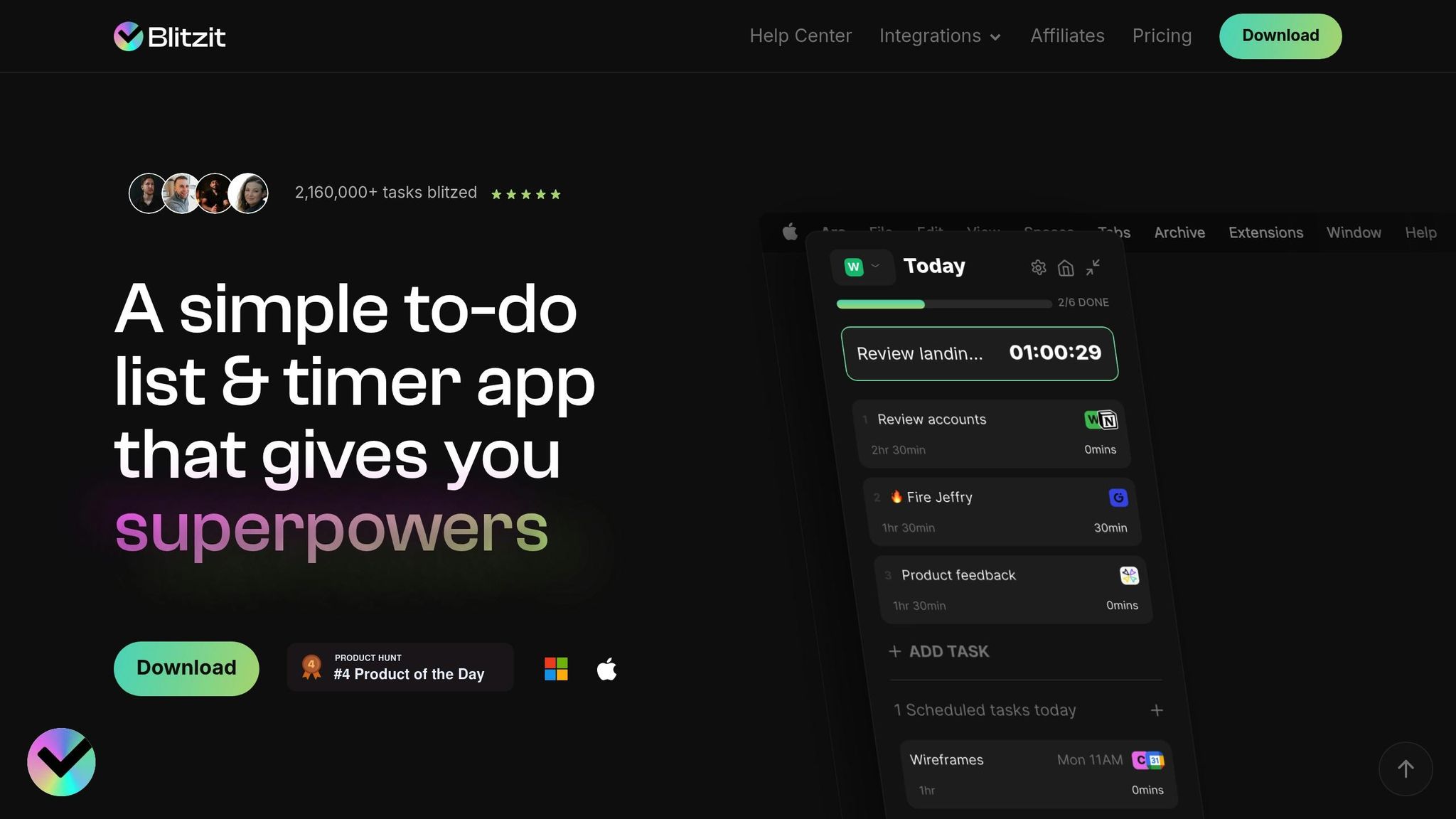
Once you've set up your routines, the next step is finding the right tool to keep you on track. Blitzit combines task management, time tracking, and productivity analysis all in one place, helping you tackle your day with greater efficiency.

Organize and Prioritize Your Tasks

Start by entering all your tasks into Blitzit. The app uses AI to help you prioritize using frameworks like the Eisenhower Matrix (which sorts tasks by urgency and importance) or the ABCDE method (ranking tasks based on their consequences). You can create custom lists, assign due dates, and estimate how long each task will take. This level of organization is key - remember the Pareto Principle: 80% of your results often come from just 20% of your efforts.

Blitzit also supports task batching. This means grouping similar tasks - like responding to emails, making calls, or writing reports - so you can minimize the mental load of constantly switching between different types of work. As Dr. Daniel Pink points out:

"Mornings are best for analytic and creative thinking, while afternoons are better for social and collaborative tasks".

Once your tasks are organized and prioritized, it's time to focus on tackling them effectively.

Stay Focused with Time Blocks

Blitzit offers Pomodoro timers to help you work in focused 25-minute intervals, followed by short breaks. The idea is simple: work on a single task for 25 minutes, take a 5-minute break, and after four cycles, enjoy a longer 15–30 minute break to recharge.

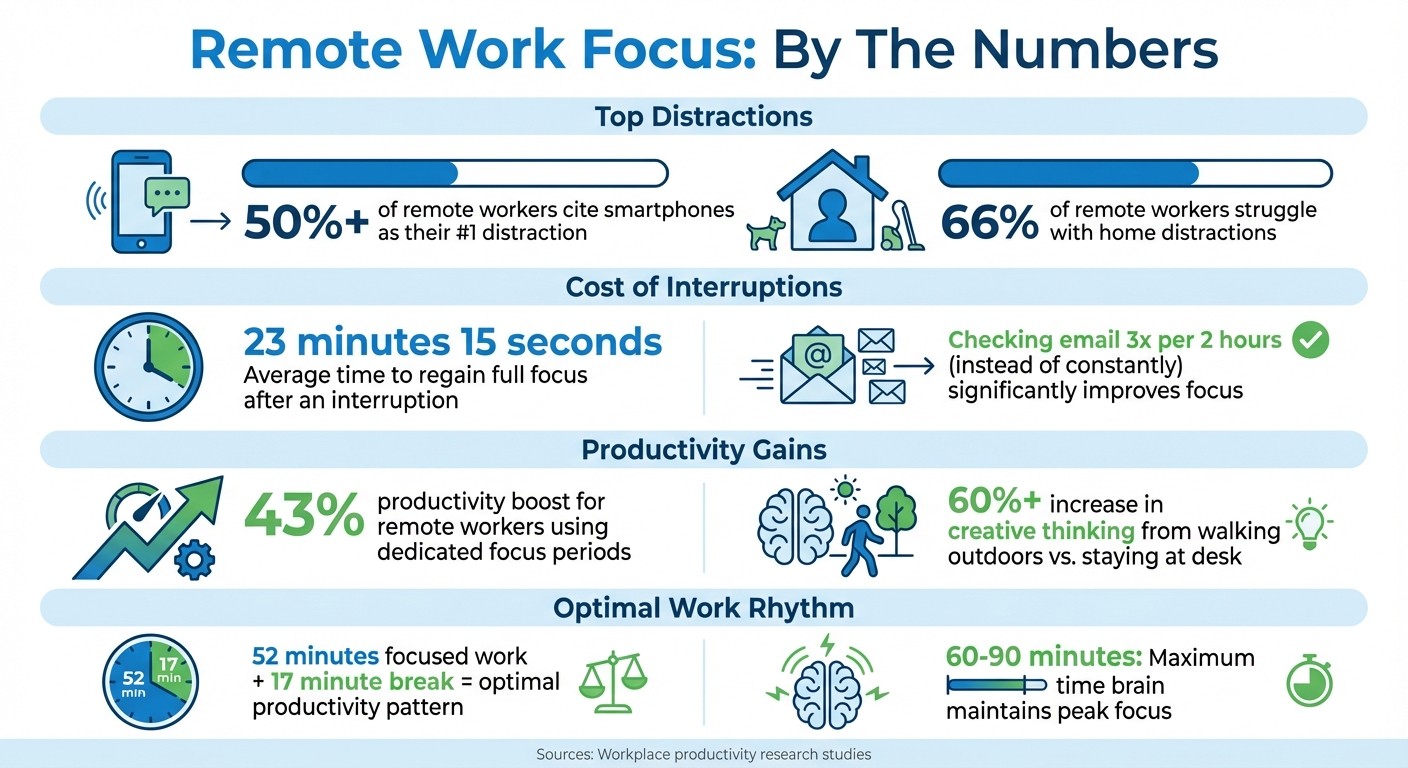
The app’s focus mode minimizes distractions, helping you stay on task. For instance, limiting email checks to three times every two hours can significantly improve focus. Why? Because every interruption can take up to 20 minutes to recover from. In fact, remote workers who use dedicated focus periods report a 43% boost in productivity.

The secret lies in single-tasking. As Dr. Sahar Yousef, a cognitive neuroscientist at UC Berkeley, explains:

"Multitasking is a myth. What you're really doing is switching between tasks. It's almost always more efficient to focus on one task at a time".

Blitzit’s tools ensure you stay locked in on one task during each time block, avoiding the pitfalls of task-switching that can drain your energy and reduce accuracy.

Track and Analyze Your Progress

Blitzit’s time tracking and productivity reports give you a clear picture of how you’re spending your hours. By analyzing these reports, you can uncover inefficiencies - like spending too much time on distractions such as social media or underestimating how long tasks take. These insights are especially valuable for remote workers, who often struggle with time management.

The reports also highlight your most productive hours, so you can reserve that time for high-priority tasks. Plus, you can export these insights to share with your manager or simply track your personal progress. This creates a feedback loop: review what’s working, adjust your approach, and watch your productivity grow week by week.

Cut Distractions and Add Movement
Remote Work Focus Statistics: Distractions, Productivity & Recovery Time


Even with top-notch tools and routines, staying focused often boils down to managing two major hurdles: digital distractions and physical inactivity.

Limit Digital Interruptions

Your smartphone is likely the biggest culprit when it comes to distractions - over half of remote workers cite it as their top focus killer. Having it within arm's reach forces your brain to work overtime to ignore it. A simple fix? Move your phone to another room during focused work sessions.

Notifications are another major challenge. Around 66% of remote workers struggle with home distractions, and constant alerts from apps like Slack, email, and social media only make it worse. Activating Do Not Disturb mode on both your phone and computer during focused work blocks can help. The stakes are high: after an interruption, it takes an average of 23 minutes and 15 seconds to fully regain focus.

To cut down on interruptions, schedule specific times to check your email - say, 9:00 AM, 1:00 PM, and 4:00 PM. Close any non-essential browser tabs and consider using tools like Freedom or Refocus to block distracting websites.

"The closed door is your way of telling the world and yourself that you mean business; you have made a serious commitment to write and intend to walk the walk as well as talk the talk".

Once you've tackled digital distractions, it's equally important to address physical inactivity with regular, active breaks.

Take Short Activity Breaks

The brain can maintain peak focus for about 60–90 minutes at a time. To keep your mind sharp, regular breaks are a must. Physical movement increases blood flow and oxygen to the brain, improving cognitive performance and helping you power through that midday slump.

Time-tracking studies suggest an effective rhythm: 52 minutes of focused work followed by a 17-minute break. While you don’t need to follow this pattern exactly, the key is to step away periodically. A quick five-minute walk, some light stretching, or even a short household task can do wonders for resetting your focus. Walking outdoors, in particular, can boost creative thinking by over 60% compared to staying at your desk.

"Methinks that the moment my legs begin to move, my thoughts begin to flow".

Feeling drained after back-to-back video calls? That’s normal. Dr. Sahar Yousef, a cognitive neuroscientist at UC Berkeley, explains:

"Video conferencing is actually physiologically more draining and requires more neurological effort to stay alert and maintain attention. At the end of the day, when your body is tired and your attention is completely sapped, it isn't your fault - your brain is overloaded".

To recharge, step away from the screen during your breaks. Rest your eyes, move your body, and give your brain the reset it needs to tackle your next task with renewed energy.

Conclusion

Staying focused isn’t about sheer willpower - it’s about creating systems that work for you. Setting up a dedicated workspace helps you mentally separate work from home life, making it easier to dive into tasks. Sticking to consistent routines minimizes decision fatigue, while setting clear boundaries with family ensures your focus time stays uninterrupted.

When you repeatedly work in the same space and follow a regular schedule, you build habits that make staying focused feel effortless over time.

Tools like Blitzit can help you stay on track by letting you prioritize tasks, schedule focused time blocks, and review your progress with detailed reports. These features align with proven productivity techniques, making it easier to stay organized and effective.

Combining these strategies with healthy boundaries doesn’t just improve productivity - it safeguards your well-being. Simple end-of-day rituals and firm limits can help you avoid burnout. With Blitzit’s time tracking, you can ensure you’re working smarter, not just putting in more hours.

Start small - choose one or two strategies from this guide and weave them into your daily routine. Even small, consistent changes can lead to big improvements over time.

FAQs

How can I separate work and personal life when working from home?

Maintaining a healthy balance between work and personal life while working from home can feel tricky, but a few simple habits can make a big difference.

Start by designating a dedicated workspace. Choose a specific spot in your home that’s strictly for work - whether it’s a spare room, a corner of your living room, or even a small desk. When your workday ends, tidy up the area and physically step away. This helps signal to your brain that the workday is officially over.

Another key step is to set a clear schedule. Establish defined start and stop times for your work, just like you would in an office. Stick to these times as closely as possible. To keep your energy up, incorporate short breaks into your day. And when the workday wraps up, create an end-of-day ritual - like going for a walk, changing into comfy clothes, or preparing dinner - to help transition into personal time.

It’s also important to communicate your work hours to those you live with. Let them know when you’re available and when you need to focus. To further limit distractions, turn off work notifications after hours. Finally, take time to regularly assess your routine. Adjust as needed to ensure you’re maintaining boundaries and staying productive without burning out.

How can I reduce digital distractions while working from home?

Minimizing digital distractions is essential for staying focused while working from home. A good starting point is activating Do Not Disturb mode on your devices to mute non-essential notifications during work hours. Adjust your app settings to block unnecessary alerts, keeping only the ones that truly matter, like urgent emails or critical updates.

Instead of reacting to messages and emails as they come in, set specific times to check them. Outside of these scheduled windows, close your email client or switch it to offline mode. You can also keep your phone on silent or place it out of reach to reduce the temptation to check it.

If you find yourself wandering to distracting websites, try using website-blocking tools to keep your focus sharp during work sessions. These small but effective steps can help create a calmer digital workspace, making it easier to tackle the unique challenges of remote work.

How can Blitzit help me stay productive while working from home?

Blitzit helps you stay productive at home by blending time-tested productivity methods into a single, user-friendly platform. Take its built-in timer, for instance - it supports structured work intervals like the 52/17 rule, where you work for 52 minutes and then take a 17-minute break. This method is known to improve focus and spark creativity. It’s also fully compatible with Pomodoro cycles, allowing you to maintain a steady flow of work without feeling overwhelmed.

The platform’s task management tools are designed to simplify your day. Using frameworks like the 1-3-5 rule - one big task, three medium tasks, and five smaller ones - you can organize your priorities with ease. Its visual task board transforms long, daunting to-do lists into clear, actionable steps. This not only reduces mental clutter but also helps you focus on what’s truly important.

Blitzit also creates a virtual workspace tailored for productivity. With features like distraction-blocking settings, soothing background music, and real-time availability indicators, it helps you set boundaries and minimize interruptions. These tools make remote work feel more structured and professional, keeping you on track to reach your goals.
How can I separate work and personal life when working from home?

Maintaining a healthy balance between work and personal life while working from home can feel tricky, but a few simple habits can make a big difference.

Start by designating a dedicated workspace. Choose a specific spot in your home that’s strictly for work - whether it’s a spare room, a corner of your living room, or even a small desk. When your workday ends, tidy up the area and physically step away. This helps signal to your brain that the workday is officially over.

Another key step is to set a clear schedule. Establish defined start and stop times for your work, just like you would in an office. Stick to these times as closely as possible. To keep your energy up, incorporate short breaks into your day. And when the workday wraps up, create an end-of-day ritual - like going for a walk, changing into comfy clothes, or preparing dinner - to help transition into personal time.

It’s also important to communicate your work hours to those you live with. Let them know when you’re available and when you need to focus. To further limit distractions, turn off work notifications after hours. Finally, take time to regularly assess your routine. Adjust as needed to ensure you’re maintaining boundaries and staying productive without burning out.

How can I reduce digital distractions while working from home?

Minimizing digital distractions is essential for staying focused while working from home. A good starting point is activating Do Not Disturb mode on your devices to mute non-essential notifications during work hours. Adjust your app settings to block unnecessary alerts, keeping only the ones that truly matter, like urgent emails or critical updates.

Instead of reacting to messages and emails as they come in, set specific times to check them. Outside of these scheduled windows, close your email client or switch it to offline mode. You can also keep your phone on silent or place it out of reach to reduce the temptation to check it.

If you find yourself wandering to distracting websites, try using website-blocking tools to keep your focus sharp during work sessions. These small but effective steps can help create a calmer digital workspace, making it easier to tackle the unique challenges of remote work.

How can Blitzit help me stay productive while working from home?

Blitzit helps you stay productive at home by blending time-tested productivity methods into a single, user-friendly platform. Take its built-in timer, for instance - it supports structured work intervals like the 52/17 rule, where you work for 52 minutes and then take a 17-minute break. This method is known to improve focus and spark creativity. It’s also fully compatible with Pomodoro cycles, allowing you to maintain a steady flow of work without feeling overwhelmed.

The platform’s task management tools are designed to simplify your day. Using frameworks like the 1-3-5 rule - one big task, three medium tasks, and five smaller ones - you can organize your priorities with ease. Its visual task board transforms long, daunting to-do lists into clear, actionable steps. This not only reduces mental clutter but also helps you focus on what’s truly important.

Blitzit also creates a virtual workspace tailored for productivity. With features like distraction-blocking settings, soothing background music, and real-time availability indicators, it helps you set boundaries and minimize interruptions. These tools make remote work feel more structured and professional, keeping you on track to reach your goals.



Working from home can be convenient, but staying focused is a challenge for many. Distractions like smartphones, household interruptions, and blurred boundaries between work and personal time make it harder to stay productive. Here's how you can take control:

  • Create a Dedicated Workspace: Set up a specific area for work to boost focus and productivity. Avoid working from beds or couches.

  • Build Routines: Start your day with a morning ritual, define work hours, and create an end-of-day routine to separate work from personal life.

  • Use Tools like Blitzit: Manage tasks, track time, and work in focused intervals using productivity tools.

  • Limit Distractions: Keep your phone out of reach, schedule email checks, and use apps to block distracting websites.

  • Take Breaks: Regular short breaks, especially with physical activity, help maintain focus and energy.

How to Focus While Working From Home | Expert Videos

Set Up a Dedicated Workspace

Repeating daily habits in the same location helps train your brain for work. When you consistently work from a specific spot, your mind starts associating that space with productivity. Authors Steve Magness and Brad Stulberg explain it well:

"When we repeatedly execute the same routine and work in the same environment, we create strong links deep inside our brain and body... Essentially, we condition ourselves to work".

This kind of mental conditioning is why having a dedicated workspace is so effective. It helps reestablish physical boundaries that might have disappeared when your commute was replaced with a short walk to your desk. The key is choosing a location that supports your focus and work mindset.

Pick the Right Spot

Look around your home for a quiet area that’s removed from busy household zones. Kitchens, hallways, and shared living spaces can be full of distractions. If you have a spare room, that’s ideal. If not, carve out a dedicated corner in your bedroom or basement. Avoid working from beds or couches - they’re too strongly associated with relaxation, which can make it harder to stay focused.

Good natural lighting is a bonus, so try to set up near a window. Position your desk to face a wall or the window itself to limit distractions. Make sure the space has enough electrical outlets and a reliable internet connection, whether through WiFi or Ethernet. If noise is a problem, consider adding sound-dampening elements like rugs, thick curtains, or even a solid-core door.

Make Your Workspace Comfortable

Comfort and ergonomics go hand in hand when setting up a workspace. If possible, invest in an ergonomic chair with adjustable lumbar support and armrests. Your feet should rest flat on the floor, and your elbows should form a 90-degree angle while typing. Poor workspace setups are a major contributor to neck and back pain, which affects at least 25% of American adults at some point.

Position your monitor at eye level so you’re looking straight ahead rather than tilting your chin up or down. If you’re using a laptop, consider a stand and an external keyboard to create a more ergonomic setup. Some companies offer equipment stipends, often between $500 and $1,000, so check if yours does.

For lighting, add a desk lamp if natural light isn’t enough, and keep your workspace organized with storage solutions to reduce clutter. To avoid stiffness, set a timer to stand and stretch every 30 to 60 minutes. These small breaks can help keep your body active and engaged throughout the day.

Build Daily Routines and Set Boundaries

Once you've set up your dedicated workspace, the next step is to establish daily routines that separate work time from personal time. Without a commute or fixed office hours, it's easy for the lines between work and life to blur. A structured routine - starting with a defined morning ritual and clear work hours - can help you stay productive and maintain balance.

Begin with a Morning Routine

Starting your day with intention can make a world of difference. The way you spend your first hour often shapes the rest of your day. Instead of jumping straight from bed to your laptop, take this time to prepare yourself mentally and physically for the tasks ahead.

Begin by drinking a glass of water to rehydrate and wake up your system. Then, change out of your pajamas into comfortable but work-appropriate clothes - this small habit signals to your brain that it's time to get into work mode.

Incorporate movement into your morning. Spend 15–20 minutes on light exercise, whether that's stretching, yoga, or a quick walk. Physical activity not only lifts your mood by releasing endorphins but also sharpens your focus before you even sit down at your desk.

Before diving into your tasks, take a moment to review your day. Identify your "Big Three" priorities - those key tasks that must get done - and consider adding a calming activity like meditation to ground yourself. As Stephen Covey famously said:

"The key is not to prioritize what's on your schedule, but to schedule your priorities".

Define Your Work Hours

Sticking to specific start and end times is crucial for avoiding the trap of being "always on." Treat your remote work schedule like a traditional office job. For example, if you start at 9:00 AM, make it a point to log off by 5:00 PM.

At the end of your workday, develop a simple routine to signal the transition to personal time. This might include tidying up your workspace, reviewing your tasks for the next day, and shutting down your work devices. These small actions help you mentally shift from work mode to relaxation mode.

Remember, the goal is to focus on results, not just the hours you log. Tools like time trackers can help you manage your productivity and ensure you're making the most of your set hours.

Tell Others About Your Schedule

Clear communication about your schedule is essential for minimizing interruptions and setting expectations. Let your family, housemates, and colleagues know your work hours. Update your email signature and digital status to reflect when you're available, and use your calendar to block out time for focused work, breaks, and your end-of-day cutoff.

This transparency not only helps others respect your boundaries but also prevents colleagues from scheduling meetings during your most productive hours. Physical cues, like closing your office door or wearing headphones, can further signal when you're in work mode.

Equally important is disconnecting when your workday ends. Turn off notifications for work apps like Slack and email to protect your personal time. By sticking to these routines and boundaries, you'll not only boost your productivity during the day but also enjoy guilt-free downtime in the evenings.

Use Blitzit for Task Management and Focus

Blitzit

Once you've set up your routines, the next step is finding the right tool to keep you on track. Blitzit combines task management, time tracking, and productivity analysis all in one place, helping you tackle your day with greater efficiency.

Organize and Prioritize Your Tasks

Start by entering all your tasks into Blitzit. The app uses AI to help you prioritize using frameworks like the Eisenhower Matrix (which sorts tasks by urgency and importance) or the ABCDE method (ranking tasks based on their consequences). You can create custom lists, assign due dates, and estimate how long each task will take. This level of organization is key - remember the Pareto Principle: 80% of your results often come from just 20% of your efforts.

Blitzit also supports task batching. This means grouping similar tasks - like responding to emails, making calls, or writing reports - so you can minimize the mental load of constantly switching between different types of work. As Dr. Daniel Pink points out:

"Mornings are best for analytic and creative thinking, while afternoons are better for social and collaborative tasks".

Once your tasks are organized and prioritized, it's time to focus on tackling them effectively.

Stay Focused with Time Blocks

Blitzit offers Pomodoro timers to help you work in focused 25-minute intervals, followed by short breaks. The idea is simple: work on a single task for 25 minutes, take a 5-minute break, and after four cycles, enjoy a longer 15–30 minute break to recharge.

The app’s focus mode minimizes distractions, helping you stay on task. For instance, limiting email checks to three times every two hours can significantly improve focus. Why? Because every interruption can take up to 20 minutes to recover from. In fact, remote workers who use dedicated focus periods report a 43% boost in productivity.

The secret lies in single-tasking. As Dr. Sahar Yousef, a cognitive neuroscientist at UC Berkeley, explains:

"Multitasking is a myth. What you're really doing is switching between tasks. It's almost always more efficient to focus on one task at a time".

Blitzit’s tools ensure you stay locked in on one task during each time block, avoiding the pitfalls of task-switching that can drain your energy and reduce accuracy.

Track and Analyze Your Progress

Blitzit’s time tracking and productivity reports give you a clear picture of how you’re spending your hours. By analyzing these reports, you can uncover inefficiencies - like spending too much time on distractions such as social media or underestimating how long tasks take. These insights are especially valuable for remote workers, who often struggle with time management.

The reports also highlight your most productive hours, so you can reserve that time for high-priority tasks. Plus, you can export these insights to share with your manager or simply track your personal progress. This creates a feedback loop: review what’s working, adjust your approach, and watch your productivity grow week by week.

Cut Distractions and Add Movement

Remote Work Focus Statistics: Distractions, Productivity & Recovery Time


Even with top-notch tools and routines, staying focused often boils down to managing two major hurdles: digital distractions and physical inactivity.

Limit Digital Interruptions

Your smartphone is likely the biggest culprit when it comes to distractions - over half of remote workers cite it as their top focus killer. Having it within arm's reach forces your brain to work overtime to ignore it. A simple fix? Move your phone to another room during focused work sessions.

Notifications are another major challenge. Around 66% of remote workers struggle with home distractions, and constant alerts from apps like Slack, email, and social media only make it worse. Activating Do Not Disturb mode on both your phone and computer during focused work blocks can help. The stakes are high: after an interruption, it takes an average of 23 minutes and 15 seconds to fully regain focus.

To cut down on interruptions, schedule specific times to check your email - say, 9:00 AM, 1:00 PM, and 4:00 PM. Close any non-essential browser tabs and consider using tools like Freedom or Refocus to block distracting websites.

"The closed door is your way of telling the world and yourself that you mean business; you have made a serious commitment to write and intend to walk the walk as well as talk the talk".

Once you've tackled digital distractions, it's equally important to address physical inactivity with regular, active breaks.

Take Short Activity Breaks

The brain can maintain peak focus for about 60–90 minutes at a time. To keep your mind sharp, regular breaks are a must. Physical movement increases blood flow and oxygen to the brain, improving cognitive performance and helping you power through that midday slump.

Time-tracking studies suggest an effective rhythm: 52 minutes of focused work followed by a 17-minute break. While you don’t need to follow this pattern exactly, the key is to step away periodically. A quick five-minute walk, some light stretching, or even a short household task can do wonders for resetting your focus. Walking outdoors, in particular, can boost creative thinking by over 60% compared to staying at your desk.

"Methinks that the moment my legs begin to move, my thoughts begin to flow".

Feeling drained after back-to-back video calls? That’s normal. Dr. Sahar Yousef, a cognitive neuroscientist at UC Berkeley, explains:

"Video conferencing is actually physiologically more draining and requires more neurological effort to stay alert and maintain attention. At the end of the day, when your body is tired and your attention is completely sapped, it isn't your fault - your brain is overloaded".

To recharge, step away from the screen during your breaks. Rest your eyes, move your body, and give your brain the reset it needs to tackle your next task with renewed energy.

Conclusion

Staying focused isn’t about sheer willpower - it’s about creating systems that work for you. Setting up a dedicated workspace helps you mentally separate work from home life, making it easier to dive into tasks. Sticking to consistent routines minimizes decision fatigue, while setting clear boundaries with family ensures your focus time stays uninterrupted.

When you repeatedly work in the same space and follow a regular schedule, you build habits that make staying focused feel effortless over time.

Tools like Blitzit can help you stay on track by letting you prioritize tasks, schedule focused time blocks, and review your progress with detailed reports. These features align with proven productivity techniques, making it easier to stay organized and effective.

Combining these strategies with healthy boundaries doesn’t just improve productivity - it safeguards your well-being. Simple end-of-day rituals and firm limits can help you avoid burnout. With Blitzit’s time tracking, you can ensure you’re working smarter, not just putting in more hours.

Start small - choose one or two strategies from this guide and weave them into your daily routine. Even small, consistent changes can lead to big improvements over time.

FAQs

How can I separate work and personal life when working from home?

Maintaining a healthy balance between work and personal life while working from home can feel tricky, but a few simple habits can make a big difference.

Start by designating a dedicated workspace. Choose a specific spot in your home that’s strictly for work - whether it’s a spare room, a corner of your living room, or even a small desk. When your workday ends, tidy up the area and physically step away. This helps signal to your brain that the workday is officially over.

Another key step is to set a clear schedule. Establish defined start and stop times for your work, just like you would in an office. Stick to these times as closely as possible. To keep your energy up, incorporate short breaks into your day. And when the workday wraps up, create an end-of-day ritual - like going for a walk, changing into comfy clothes, or preparing dinner - to help transition into personal time.

It’s also important to communicate your work hours to those you live with. Let them know when you’re available and when you need to focus. To further limit distractions, turn off work notifications after hours. Finally, take time to regularly assess your routine. Adjust as needed to ensure you’re maintaining boundaries and staying productive without burning out.

How can I reduce digital distractions while working from home?

Minimizing digital distractions is essential for staying focused while working from home. A good starting point is activating Do Not Disturb mode on your devices to mute non-essential notifications during work hours. Adjust your app settings to block unnecessary alerts, keeping only the ones that truly matter, like urgent emails or critical updates.

Instead of reacting to messages and emails as they come in, set specific times to check them. Outside of these scheduled windows, close your email client or switch it to offline mode. You can also keep your phone on silent or place it out of reach to reduce the temptation to check it.

If you find yourself wandering to distracting websites, try using website-blocking tools to keep your focus sharp during work sessions. These small but effective steps can help create a calmer digital workspace, making it easier to tackle the unique challenges of remote work.

How can Blitzit help me stay productive while working from home?

Blitzit helps you stay productive at home by blending time-tested productivity methods into a single, user-friendly platform. Take its built-in timer, for instance - it supports structured work intervals like the 52/17 rule, where you work for 52 minutes and then take a 17-minute break. This method is known to improve focus and spark creativity. It’s also fully compatible with Pomodoro cycles, allowing you to maintain a steady flow of work without feeling overwhelmed.

The platform’s task management tools are designed to simplify your day. Using frameworks like the 1-3-5 rule - one big task, three medium tasks, and five smaller ones - you can organize your priorities with ease. Its visual task board transforms long, daunting to-do lists into clear, actionable steps. This not only reduces mental clutter but also helps you focus on what’s truly important.

Blitzit also creates a virtual workspace tailored for productivity. With features like distraction-blocking settings, soothing background music, and real-time availability indicators, it helps you set boundaries and minimize interruptions. These tools make remote work feel more structured and professional, keeping you on track to reach your goals.

How can I separate work and personal life when working from home?

Maintaining a healthy balance between work and personal life while working from home can feel tricky, but a few simple habits can make a big difference.

Start by designating a dedicated workspace. Choose a specific spot in your home that’s strictly for work - whether it’s a spare room, a corner of your living room, or even a small desk. When your workday ends, tidy up the area and physically step away. This helps signal to your brain that the workday is officially over.

Another key step is to set a clear schedule. Establish defined start and stop times for your work, just like you would in an office. Stick to these times as closely as possible. To keep your energy up, incorporate short breaks into your day. And when the workday wraps up, create an end-of-day ritual - like going for a walk, changing into comfy clothes, or preparing dinner - to help transition into personal time.

It’s also important to communicate your work hours to those you live with. Let them know when you’re available and when you need to focus. To further limit distractions, turn off work notifications after hours. Finally, take time to regularly assess your routine. Adjust as needed to ensure you’re maintaining boundaries and staying productive without burning out.

How can I reduce digital distractions while working from home?

Minimizing digital distractions is essential for staying focused while working from home. A good starting point is activating Do Not Disturb mode on your devices to mute non-essential notifications during work hours. Adjust your app settings to block unnecessary alerts, keeping only the ones that truly matter, like urgent emails or critical updates.

Instead of reacting to messages and emails as they come in, set specific times to check them. Outside of these scheduled windows, close your email client or switch it to offline mode. You can also keep your phone on silent or place it out of reach to reduce the temptation to check it.

If you find yourself wandering to distracting websites, try using website-blocking tools to keep your focus sharp during work sessions. These small but effective steps can help create a calmer digital workspace, making it easier to tackle the unique challenges of remote work.

How can Blitzit help me stay productive while working from home?

Blitzit helps you stay productive at home by blending time-tested productivity methods into a single, user-friendly platform. Take its built-in timer, for instance - it supports structured work intervals like the 52/17 rule, where you work for 52 minutes and then take a 17-minute break. This method is known to improve focus and spark creativity. It’s also fully compatible with Pomodoro cycles, allowing you to maintain a steady flow of work without feeling overwhelmed.

The platform’s task management tools are designed to simplify your day. Using frameworks like the 1-3-5 rule - one big task, three medium tasks, and five smaller ones - you can organize your priorities with ease. Its visual task board transforms long, daunting to-do lists into clear, actionable steps. This not only reduces mental clutter but also helps you focus on what’s truly important.

Blitzit also creates a virtual workspace tailored for productivity. With features like distraction-blocking settings, soothing background music, and real-time availability indicators, it helps you set boundaries and minimize interruptions. These tools make remote work feel more structured and professional, keeping you on track to reach your goals.


Working from home can be convenient, but staying focused is a challenge for many. Distractions like smartphones, household interruptions, and blurred boundaries between work and personal time make it harder to stay productive. Here's how you can take control:

  • Create a Dedicated Workspace: Set up a specific area for work to boost focus and productivity. Avoid working from beds or couches.

  • Build Routines: Start your day with a morning ritual, define work hours, and create an end-of-day routine to separate work from personal life.

  • Use Tools like Blitzit: Manage tasks, track time, and work in focused intervals using productivity tools.

  • Limit Distractions: Keep your phone out of reach, schedule email checks, and use apps to block distracting websites.

  • Take Breaks: Regular short breaks, especially with physical activity, help maintain focus and energy.

How to Focus While Working From Home | Expert Videos

Set Up a Dedicated Workspace

Repeating daily habits in the same location helps train your brain for work. When you consistently work from a specific spot, your mind starts associating that space with productivity. Authors Steve Magness and Brad Stulberg explain it well:

"When we repeatedly execute the same routine and work in the same environment, we create strong links deep inside our brain and body... Essentially, we condition ourselves to work".

This kind of mental conditioning is why having a dedicated workspace is so effective. It helps reestablish physical boundaries that might have disappeared when your commute was replaced with a short walk to your desk. The key is choosing a location that supports your focus and work mindset.

Pick the Right Spot

Look around your home for a quiet area that’s removed from busy household zones. Kitchens, hallways, and shared living spaces can be full of distractions. If you have a spare room, that’s ideal. If not, carve out a dedicated corner in your bedroom or basement. Avoid working from beds or couches - they’re too strongly associated with relaxation, which can make it harder to stay focused.

Good natural lighting is a bonus, so try to set up near a window. Position your desk to face a wall or the window itself to limit distractions. Make sure the space has enough electrical outlets and a reliable internet connection, whether through WiFi or Ethernet. If noise is a problem, consider adding sound-dampening elements like rugs, thick curtains, or even a solid-core door.

Make Your Workspace Comfortable

Comfort and ergonomics go hand in hand when setting up a workspace. If possible, invest in an ergonomic chair with adjustable lumbar support and armrests. Your feet should rest flat on the floor, and your elbows should form a 90-degree angle while typing. Poor workspace setups are a major contributor to neck and back pain, which affects at least 25% of American adults at some point.

Position your monitor at eye level so you’re looking straight ahead rather than tilting your chin up or down. If you’re using a laptop, consider a stand and an external keyboard to create a more ergonomic setup. Some companies offer equipment stipends, often between $500 and $1,000, so check if yours does.

For lighting, add a desk lamp if natural light isn’t enough, and keep your workspace organized with storage solutions to reduce clutter. To avoid stiffness, set a timer to stand and stretch every 30 to 60 minutes. These small breaks can help keep your body active and engaged throughout the day.

Build Daily Routines and Set Boundaries

Once you've set up your dedicated workspace, the next step is to establish daily routines that separate work time from personal time. Without a commute or fixed office hours, it's easy for the lines between work and life to blur. A structured routine - starting with a defined morning ritual and clear work hours - can help you stay productive and maintain balance.

Begin with a Morning Routine

Starting your day with intention can make a world of difference. The way you spend your first hour often shapes the rest of your day. Instead of jumping straight from bed to your laptop, take this time to prepare yourself mentally and physically for the tasks ahead.

Begin by drinking a glass of water to rehydrate and wake up your system. Then, change out of your pajamas into comfortable but work-appropriate clothes - this small habit signals to your brain that it's time to get into work mode.

Incorporate movement into your morning. Spend 15–20 minutes on light exercise, whether that's stretching, yoga, or a quick walk. Physical activity not only lifts your mood by releasing endorphins but also sharpens your focus before you even sit down at your desk.

Before diving into your tasks, take a moment to review your day. Identify your "Big Three" priorities - those key tasks that must get done - and consider adding a calming activity like meditation to ground yourself. As Stephen Covey famously said:

"The key is not to prioritize what's on your schedule, but to schedule your priorities".

Define Your Work Hours

Sticking to specific start and end times is crucial for avoiding the trap of being "always on." Treat your remote work schedule like a traditional office job. For example, if you start at 9:00 AM, make it a point to log off by 5:00 PM.

At the end of your workday, develop a simple routine to signal the transition to personal time. This might include tidying up your workspace, reviewing your tasks for the next day, and shutting down your work devices. These small actions help you mentally shift from work mode to relaxation mode.

Remember, the goal is to focus on results, not just the hours you log. Tools like time trackers can help you manage your productivity and ensure you're making the most of your set hours.

Tell Others About Your Schedule

Clear communication about your schedule is essential for minimizing interruptions and setting expectations. Let your family, housemates, and colleagues know your work hours. Update your email signature and digital status to reflect when you're available, and use your calendar to block out time for focused work, breaks, and your end-of-day cutoff.

This transparency not only helps others respect your boundaries but also prevents colleagues from scheduling meetings during your most productive hours. Physical cues, like closing your office door or wearing headphones, can further signal when you're in work mode.

Equally important is disconnecting when your workday ends. Turn off notifications for work apps like Slack and email to protect your personal time. By sticking to these routines and boundaries, you'll not only boost your productivity during the day but also enjoy guilt-free downtime in the evenings.

Use Blitzit for Task Management and Focus

Blitzit

Once you've set up your routines, the next step is finding the right tool to keep you on track. Blitzit combines task management, time tracking, and productivity analysis all in one place, helping you tackle your day with greater efficiency.

Organize and Prioritize Your Tasks

Start by entering all your tasks into Blitzit. The app uses AI to help you prioritize using frameworks like the Eisenhower Matrix (which sorts tasks by urgency and importance) or the ABCDE method (ranking tasks based on their consequences). You can create custom lists, assign due dates, and estimate how long each task will take. This level of organization is key - remember the Pareto Principle: 80% of your results often come from just 20% of your efforts.

Blitzit also supports task batching. This means grouping similar tasks - like responding to emails, making calls, or writing reports - so you can minimize the mental load of constantly switching between different types of work. As Dr. Daniel Pink points out:

"Mornings are best for analytic and creative thinking, while afternoons are better for social and collaborative tasks".

Once your tasks are organized and prioritized, it's time to focus on tackling them effectively.

Stay Focused with Time Blocks

Blitzit offers Pomodoro timers to help you work in focused 25-minute intervals, followed by short breaks. The idea is simple: work on a single task for 25 minutes, take a 5-minute break, and after four cycles, enjoy a longer 15–30 minute break to recharge.

The app’s focus mode minimizes distractions, helping you stay on task. For instance, limiting email checks to three times every two hours can significantly improve focus. Why? Because every interruption can take up to 20 minutes to recover from. In fact, remote workers who use dedicated focus periods report a 43% boost in productivity.

The secret lies in single-tasking. As Dr. Sahar Yousef, a cognitive neuroscientist at UC Berkeley, explains:

"Multitasking is a myth. What you're really doing is switching between tasks. It's almost always more efficient to focus on one task at a time".

Blitzit’s tools ensure you stay locked in on one task during each time block, avoiding the pitfalls of task-switching that can drain your energy and reduce accuracy.

Track and Analyze Your Progress

Blitzit’s time tracking and productivity reports give you a clear picture of how you’re spending your hours. By analyzing these reports, you can uncover inefficiencies - like spending too much time on distractions such as social media or underestimating how long tasks take. These insights are especially valuable for remote workers, who often struggle with time management.

The reports also highlight your most productive hours, so you can reserve that time for high-priority tasks. Plus, you can export these insights to share with your manager or simply track your personal progress. This creates a feedback loop: review what’s working, adjust your approach, and watch your productivity grow week by week.

Cut Distractions and Add Movement

Remote Work Focus Statistics: Distractions, Productivity & Recovery Time


Even with top-notch tools and routines, staying focused often boils down to managing two major hurdles: digital distractions and physical inactivity.

Limit Digital Interruptions

Your smartphone is likely the biggest culprit when it comes to distractions - over half of remote workers cite it as their top focus killer. Having it within arm's reach forces your brain to work overtime to ignore it. A simple fix? Move your phone to another room during focused work sessions.

Notifications are another major challenge. Around 66% of remote workers struggle with home distractions, and constant alerts from apps like Slack, email, and social media only make it worse. Activating Do Not Disturb mode on both your phone and computer during focused work blocks can help. The stakes are high: after an interruption, it takes an average of 23 minutes and 15 seconds to fully regain focus.

To cut down on interruptions, schedule specific times to check your email - say, 9:00 AM, 1:00 PM, and 4:00 PM. Close any non-essential browser tabs and consider using tools like Freedom or Refocus to block distracting websites.

"The closed door is your way of telling the world and yourself that you mean business; you have made a serious commitment to write and intend to walk the walk as well as talk the talk".

Once you've tackled digital distractions, it's equally important to address physical inactivity with regular, active breaks.

Take Short Activity Breaks

The brain can maintain peak focus for about 60–90 minutes at a time. To keep your mind sharp, regular breaks are a must. Physical movement increases blood flow and oxygen to the brain, improving cognitive performance and helping you power through that midday slump.

Time-tracking studies suggest an effective rhythm: 52 minutes of focused work followed by a 17-minute break. While you don’t need to follow this pattern exactly, the key is to step away periodically. A quick five-minute walk, some light stretching, or even a short household task can do wonders for resetting your focus. Walking outdoors, in particular, can boost creative thinking by over 60% compared to staying at your desk.

"Methinks that the moment my legs begin to move, my thoughts begin to flow".

Feeling drained after back-to-back video calls? That’s normal. Dr. Sahar Yousef, a cognitive neuroscientist at UC Berkeley, explains:

"Video conferencing is actually physiologically more draining and requires more neurological effort to stay alert and maintain attention. At the end of the day, when your body is tired and your attention is completely sapped, it isn't your fault - your brain is overloaded".

To recharge, step away from the screen during your breaks. Rest your eyes, move your body, and give your brain the reset it needs to tackle your next task with renewed energy.

Conclusion

Staying focused isn’t about sheer willpower - it’s about creating systems that work for you. Setting up a dedicated workspace helps you mentally separate work from home life, making it easier to dive into tasks. Sticking to consistent routines minimizes decision fatigue, while setting clear boundaries with family ensures your focus time stays uninterrupted.

When you repeatedly work in the same space and follow a regular schedule, you build habits that make staying focused feel effortless over time.

Tools like Blitzit can help you stay on track by letting you prioritize tasks, schedule focused time blocks, and review your progress with detailed reports. These features align with proven productivity techniques, making it easier to stay organized and effective.

Combining these strategies with healthy boundaries doesn’t just improve productivity - it safeguards your well-being. Simple end-of-day rituals and firm limits can help you avoid burnout. With Blitzit’s time tracking, you can ensure you’re working smarter, not just putting in more hours.

Start small - choose one or two strategies from this guide and weave them into your daily routine. Even small, consistent changes can lead to big improvements over time.

FAQs

How can I separate work and personal life when working from home?

Maintaining a healthy balance between work and personal life while working from home can feel tricky, but a few simple habits can make a big difference.

Start by designating a dedicated workspace. Choose a specific spot in your home that’s strictly for work - whether it’s a spare room, a corner of your living room, or even a small desk. When your workday ends, tidy up the area and physically step away. This helps signal to your brain that the workday is officially over.

Another key step is to set a clear schedule. Establish defined start and stop times for your work, just like you would in an office. Stick to these times as closely as possible. To keep your energy up, incorporate short breaks into your day. And when the workday wraps up, create an end-of-day ritual - like going for a walk, changing into comfy clothes, or preparing dinner - to help transition into personal time.

It’s also important to communicate your work hours to those you live with. Let them know when you’re available and when you need to focus. To further limit distractions, turn off work notifications after hours. Finally, take time to regularly assess your routine. Adjust as needed to ensure you’re maintaining boundaries and staying productive without burning out.

How can I reduce digital distractions while working from home?

Minimizing digital distractions is essential for staying focused while working from home. A good starting point is activating Do Not Disturb mode on your devices to mute non-essential notifications during work hours. Adjust your app settings to block unnecessary alerts, keeping only the ones that truly matter, like urgent emails or critical updates.

Instead of reacting to messages and emails as they come in, set specific times to check them. Outside of these scheduled windows, close your email client or switch it to offline mode. You can also keep your phone on silent or place it out of reach to reduce the temptation to check it.

If you find yourself wandering to distracting websites, try using website-blocking tools to keep your focus sharp during work sessions. These small but effective steps can help create a calmer digital workspace, making it easier to tackle the unique challenges of remote work.

How can Blitzit help me stay productive while working from home?

Blitzit helps you stay productive at home by blending time-tested productivity methods into a single, user-friendly platform. Take its built-in timer, for instance - it supports structured work intervals like the 52/17 rule, where you work for 52 minutes and then take a 17-minute break. This method is known to improve focus and spark creativity. It’s also fully compatible with Pomodoro cycles, allowing you to maintain a steady flow of work without feeling overwhelmed.

The platform’s task management tools are designed to simplify your day. Using frameworks like the 1-3-5 rule - one big task, three medium tasks, and five smaller ones - you can organize your priorities with ease. Its visual task board transforms long, daunting to-do lists into clear, actionable steps. This not only reduces mental clutter but also helps you focus on what’s truly important.

Blitzit also creates a virtual workspace tailored for productivity. With features like distraction-blocking settings, soothing background music, and real-time availability indicators, it helps you set boundaries and minimize interruptions. These tools make remote work feel more structured and professional, keeping you on track to reach your goals.

How can I separate work and personal life when working from home?

Maintaining a healthy balance between work and personal life while working from home can feel tricky, but a few simple habits can make a big difference.

Start by designating a dedicated workspace. Choose a specific spot in your home that’s strictly for work - whether it’s a spare room, a corner of your living room, or even a small desk. When your workday ends, tidy up the area and physically step away. This helps signal to your brain that the workday is officially over.

Another key step is to set a clear schedule. Establish defined start and stop times for your work, just like you would in an office. Stick to these times as closely as possible. To keep your energy up, incorporate short breaks into your day. And when the workday wraps up, create an end-of-day ritual - like going for a walk, changing into comfy clothes, or preparing dinner - to help transition into personal time.

It’s also important to communicate your work hours to those you live with. Let them know when you’re available and when you need to focus. To further limit distractions, turn off work notifications after hours. Finally, take time to regularly assess your routine. Adjust as needed to ensure you’re maintaining boundaries and staying productive without burning out.

How can I reduce digital distractions while working from home?

Minimizing digital distractions is essential for staying focused while working from home. A good starting point is activating Do Not Disturb mode on your devices to mute non-essential notifications during work hours. Adjust your app settings to block unnecessary alerts, keeping only the ones that truly matter, like urgent emails or critical updates.

Instead of reacting to messages and emails as they come in, set specific times to check them. Outside of these scheduled windows, close your email client or switch it to offline mode. You can also keep your phone on silent or place it out of reach to reduce the temptation to check it.

If you find yourself wandering to distracting websites, try using website-blocking tools to keep your focus sharp during work sessions. These small but effective steps can help create a calmer digital workspace, making it easier to tackle the unique challenges of remote work.

How can Blitzit help me stay productive while working from home?

Blitzit helps you stay productive at home by blending time-tested productivity methods into a single, user-friendly platform. Take its built-in timer, for instance - it supports structured work intervals like the 52/17 rule, where you work for 52 minutes and then take a 17-minute break. This method is known to improve focus and spark creativity. It’s also fully compatible with Pomodoro cycles, allowing you to maintain a steady flow of work without feeling overwhelmed.

The platform’s task management tools are designed to simplify your day. Using frameworks like the 1-3-5 rule - one big task, three medium tasks, and five smaller ones - you can organize your priorities with ease. Its visual task board transforms long, daunting to-do lists into clear, actionable steps. This not only reduces mental clutter but also helps you focus on what’s truly important.

Blitzit also creates a virtual workspace tailored for productivity. With features like distraction-blocking settings, soothing background music, and real-time availability indicators, it helps you set boundaries and minimize interruptions. These tools make remote work feel more structured and professional, keeping you on track to reach your goals.