If you've ever downloaded a productivity app with sky-high hopes only to abandon it two weeks later, you're not alone. For people with ADHD, most mainstream task managers and to-do lists feel like they were designed for someone else's brain entirely. The constant manual entry, rigid structures, and guilt-inducing reminders? They don't help; they just add another layer of overwhelm.
But here's the good news: the best ADHD apps for productivity are built differently. They understand that your attention fluctuates, your energy isn't predictable, and "just write it down" isn't that simple.
In this guide, we'll break down why traditional apps fall flat, what features genuinely support ADHD brains, and which tools, including Blitzit, might finally help you get things done without burning out.
Why Standard Productivity Apps Often Fall Short for ADHD
Most productivity apps are built on a set of assumptions that simply don't hold true for ADHD brains. They assume you have consistent energy levels throughout the day, that starting a task is as easy as deciding to do it, and that you can maintain linear focus from point A to point B. For neurotypical users, these assumptions might work fine. For you? Not so much.
The reality is that ADHD involves fluctuating attention, task paralysis (that frozen feeling when you know you need to start something but can't), working memory gaps, and emotional dysregulation. Traditional apps don't account for any of this. They demand upfront planning, require manual maintenance, and create cognitive load through constant context-switching.
Think about it: most to-do list apps expect you to sit down, think through your tasks, type them all out, assign due dates, maybe add tags or categories... and then remember to check the app later. Each of those steps is a potential point of friction. And friction is the enemy of productivity when you're already battling executive dysfunction.
There's also the guilt factor. Standard apps love to show you overdue tasks, missed deadlines, and incomplete streaks. For someone with ADHD, this doesn't motivate; it demoralizes. You don't need an app that makes you feel bad about yesterday. You need one that helps you show up today.
What to Look for in an ADHD-Friendly Productivity App
So what separates an ADHD-friendly app from the rest of the pack? A few key principles make all the difference.
Automation over manual entry. The less you have to do to capture a task, the better. Apps that extract tasks from voice notes, screenshots, or even messy brain dumps reduce the decision fatigue that kills productivity before it starts.
Centralization. Jumping between five different apps for notes, tasks, calendar, and reminders is a recipe for losing track of everything. The best tools bring it all together in one place, so you're not relying on your working memory to connect the dots.
Flexibility for non-linear thinking. ADHD brains don't always work in straight lines. You might need to reorganize your priorities mid-day, break tasks into subtasks on the fly, or shift focus when inspiration strikes. Rigid systems fight against this: adaptable ones work with it.
Low-friction entry. If adding a task takes more than a few seconds, you probably won't do it. Look for apps with quick capture features, voice input, or minimal required fields.
Compassionate design. This one's subtle but important. The app shouldn't shame you for incomplete tasks or broken streaks. Instead, it should offer gentle nudges and celebrate small wins.
Support for time blindness. Visual timers, session reminders, and break prompts help externalize your sense of time, something ADHD brains notoriously struggle with.
Task Management Apps That Support ADHD Brains
Task management apps form the backbone of any ADHD productivity system. Todoist stands out for its quick capture feature, perfect for those brilliant ideas that strike at 2 AM. Its natural language input means you can type "Email client tomorrow at 2 pm" and it just works. The subtask feature helps break down overwhelming projects into bite-sized pieces your brain can handle.
TickTick takes things further with built-in Pomodoro timers and habit tracking. You're not jumping between five different apps: everything lives in one place. The calendar view gives you that crucial visual overview of your commitments, preventing the dreaded double-booking that happens when time blindness strikes.
For team projects or collaborative work, Asana provides structure without overwhelming complexity. Its visual project boards make abstract workflows concrete, and the celebration animations when you complete tasks? Surprisingly motivating.
Blitzit takes a unique approach by combining a simple to-do list with an always-visible floating countdown timer. The idea is straightforward: you prioritize your tasks, hit "Blitz Mode," and your top task automatically goes into a live timer. The rest of your list stays organized below. This single-task focus helps reduce the overwhelm of staring at a massive list and wondering where to start.
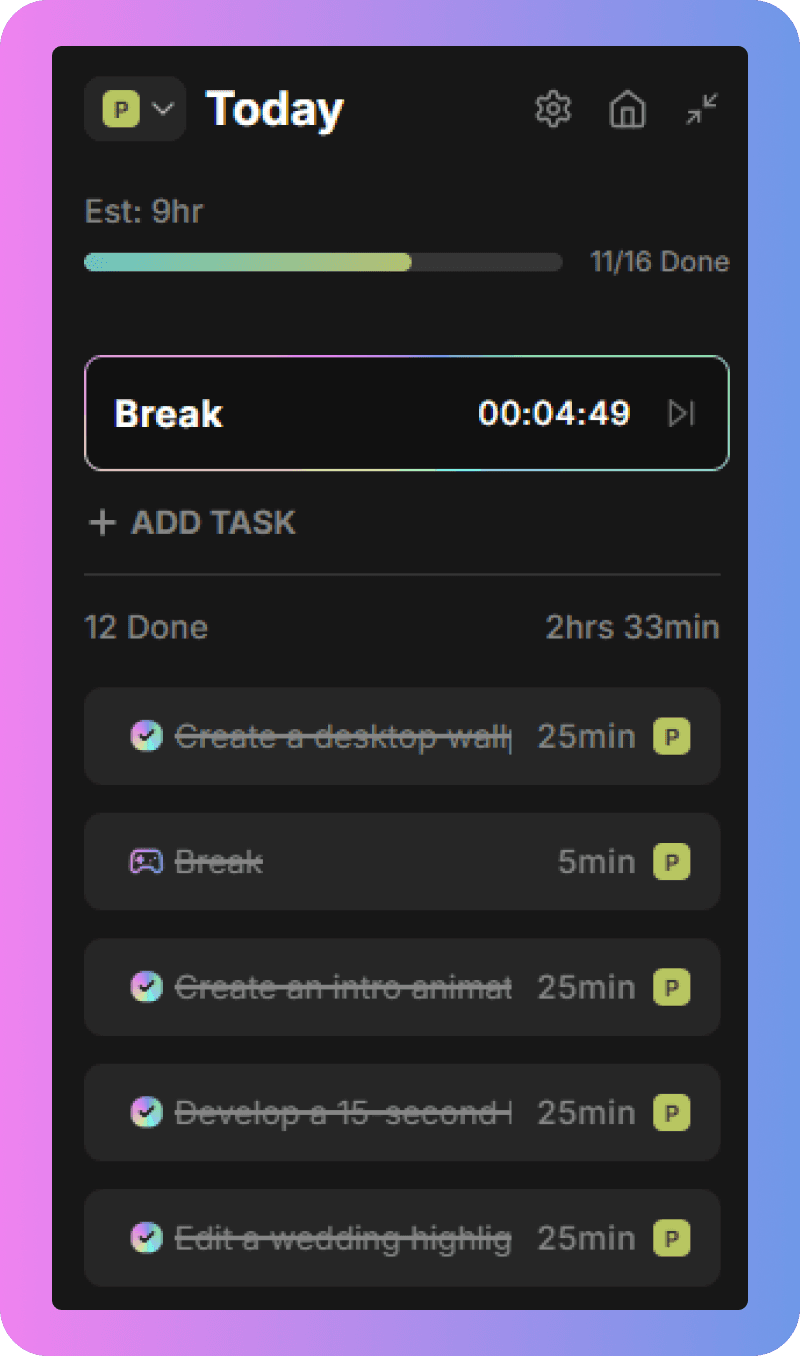
What makes Blitzit particularly useful for ADHD is its Pomodoro timer integration, subtask support, and productivity reports. You can break larger tasks into bite-sized milestones, which makes daunting projects feel manageable. The productivity reports show you patterns like your most productive hour, day, and month, data that helps you work with your natural rhythms instead of against them.
Focus and Time Management Tools
When maintaining focus with ADHD, you need more than willpower; you need the right tools. Focus Keeper makes the Pomodoro Technique ADHD-friendly with customizable work sessions and break times. The visual timer shows time passing in a way your brain can process, transforming the abstract concept of "25 minutes" into something tangible.
Forest gamifies focus in the most delightful way. Start a focus session, and a virtual tree begins growing. Leave the app to check social media? Your tree withers and dies. It sounds simple, but watching your forest grow over time provides that dopamine hit ADHD brains crave. Plus, the app partners with real tree-planting organizations, so your focus sessions contribute to actual reforestation.
Numo goes beyond basic timers with features specifically designed for neurodivergent minds. The noise generator helps mask distracting sounds, while the body doubling feature connects you with others working in real-time. Sometimes, just knowing someone else is grinding through their tasks makes it easier to tackle your own.
Now, this is where Blitzit enters the conversation. Unlike apps that try to do everything, Blitzit focuses on what matters most: helping you maintain momentum. Your top priority task automatically loads into a floating timer that stays visible no matter what else you're doing. No hunting through tabs or forgetting what you're supposed to be working on.
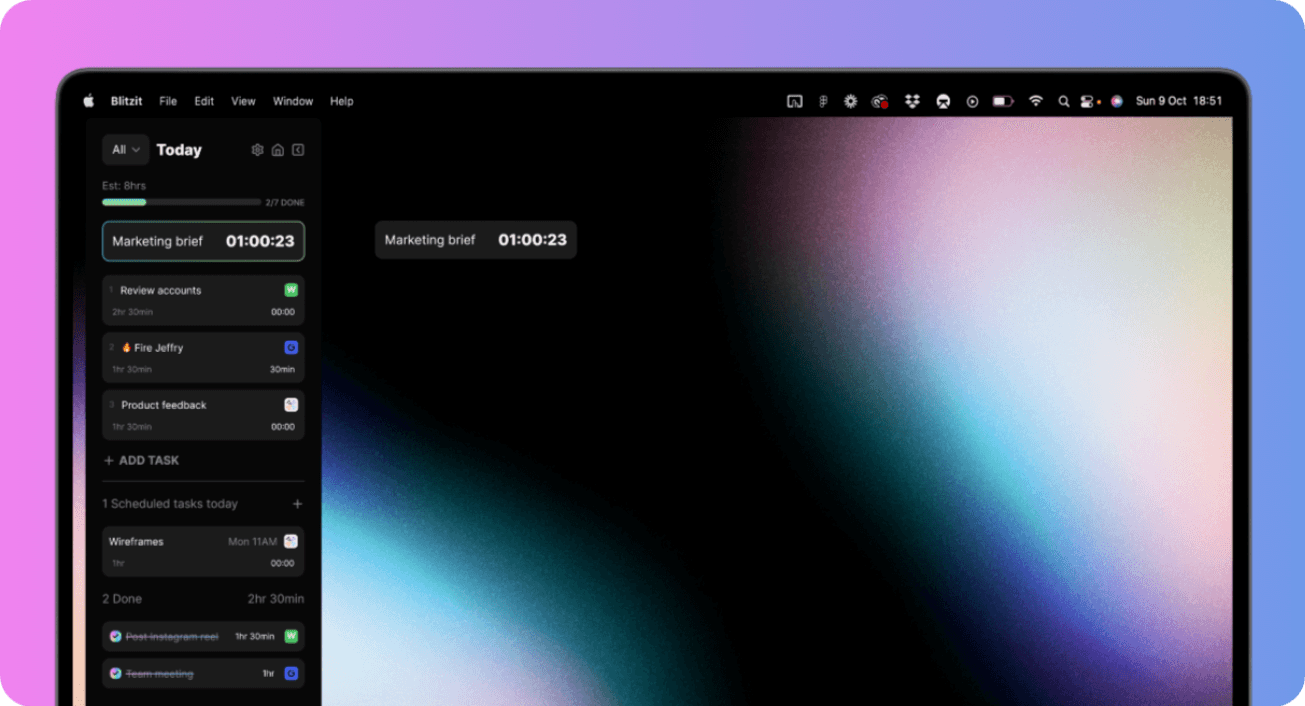
The Focus Panel gives you that bird's-eye view of your day without overwhelming you with options. Tasks flow from one to the next, and the timer adapts based on your preferences, whether you need Pomodoro sessions, countdown timers based on your time estimates, or simple time tracking. The productivity reports show your patterns over time, helping you understand when you're most productive and plan accordingly.
Note-Taking and Brain Dump Solutions
Racing thoughts at 3 AM? Random brilliant ideas during meetings? The ADHD brain generates ideas at the worst possible times. You need capture tools that work as fast as your thoughts move.
Ellie Planner excels at brain dumps with its minimalist interface. No complicated formatting or organization required, just dump everything out and sort it later. The visual simplicity reduces the friction between thought and capture.
Reflectly takes a different approach with AI-guided journaling. Instead of staring at a blank page (hello, paralysis), the app prompts you with questions that help organize your thoughts. It's like having a gentle conversation with yourself, guided by someone who knows exactly what to ask.
Habit-Building and Daily Routine Apps
Building habits with ADHD feels like trying to stick Jell-O to a wall. Your brain craves novelty, making consistency feel impossible. But the right apps can hack this system.
Habitica turns your entire life into an RPG. Complete real-world tasks, earn experience points, and level up your character. Miss too many habits? Your character takes damage. The gamification is intense enough to keep ADHD brains engaged long-term. Join parties with friends for accountability, and battle bosses together by completing your collective tasks. Suddenly, flossing your teeth affects whether your party defeats the dragon.
Brili focuses specifically on routines, breaking them into visual, timed steps. Morning routine includes shower, breakfast, and getting dressed? Brili shows each step with a countdown, playing pleasant sounds when you complete each one. It's particularly brilliant for kids with ADHD, but honestly, adults benefit just as much from the structure.
Numo combines habit tracking with community support. Earn points and rewards for completing habits, but more importantly, share your wins and struggles with others who get it. The body doubling feature means you can virtually "sit" with others while building new routines.
Blitzit supports habit building through its scheduling features. Set recurring tasks for daily routines, and they'll appear in your Today column automatically. The time estimates help you understand how long routines take (spoiler: usually longer than you think), preventing that rushed, chaotic morning scramble.
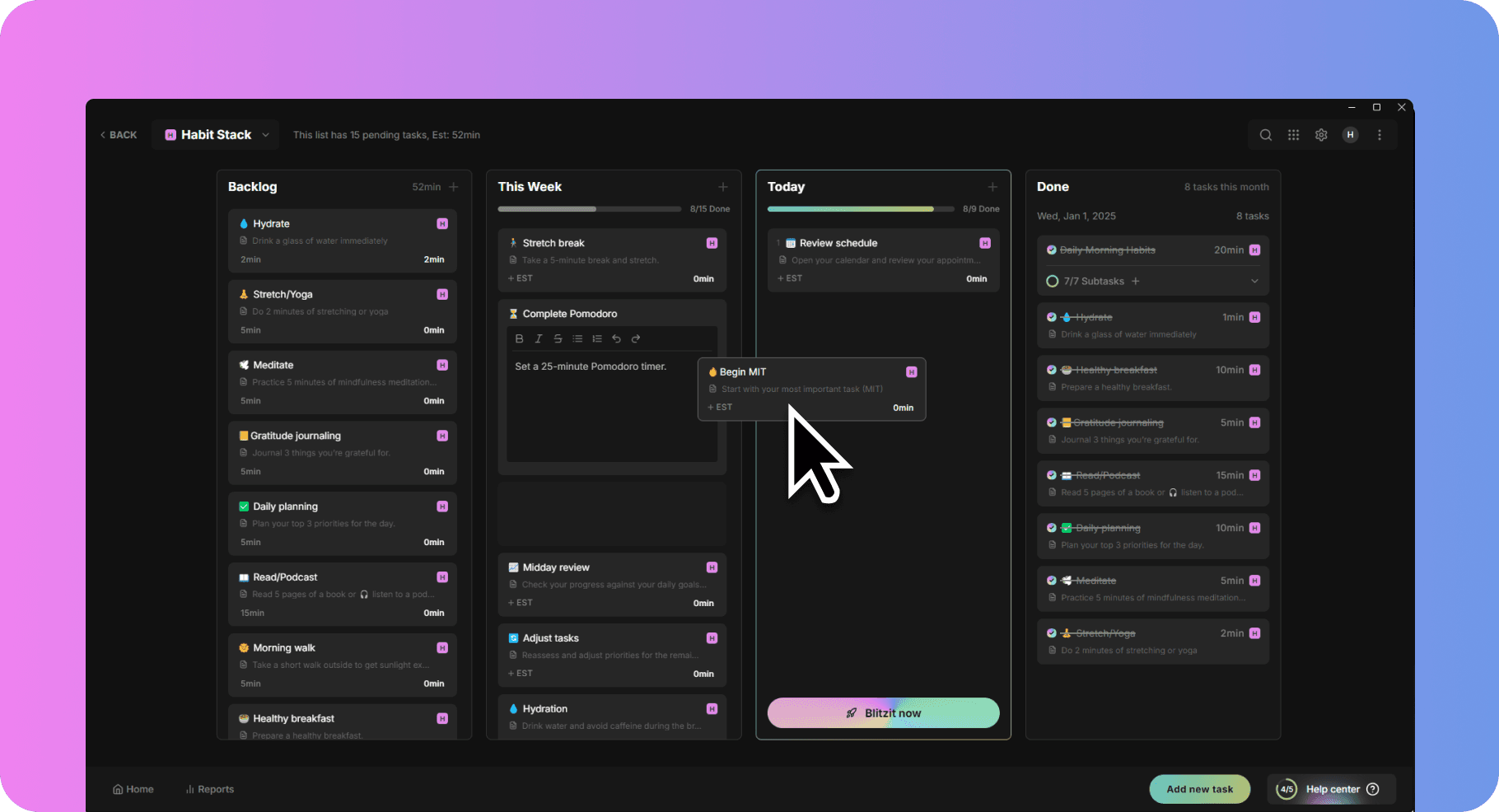
The key with ADHD habit building isn't perfection; it's consistency. These apps provide the external structure and rewards your brain needs to make habits stick, even when your internal motivation fluctuates.
How to Choose the Right App for Your Needs
With so many options out there, picking the right productivity app can feel like another overwhelming decision. Here's a practical framework to help you narrow things down.
Start with your biggest pain point. Is it capturing tasks? Staying focused? Managing time? Finding an app that addresses your primary struggle will have more impact than one that does a little of everything.
Test for cognitive load. Download the app and try using it for a few days. Does it feel easy to use, or do you have to think too hard about how it works? If there's too much friction, you won't stick with it, no matter how many features it has.
Look for ADHD-specific features. Timers, subtasks, low-entry-friction task capture, visual progress indicators, and compassionate design all signal that an app understands how your brain works.
Consider how it fits your existing habits. Do you already take voice notes? Look for apps with voice input. Do you work primarily on desktop? Make sure the app has a strong desktop experience. The less you have to change your natural workflow, the better.
Conclusion
Finding the best ADHD apps for productivity isn't about downloading the most popular tool or the one with the longest feature list. It's about finding something that works with your brain instead of against it.
That means prioritizing automation, low friction, visual timers, flexible structures, and compassionate design. It means accepting that what works for neurotypical users might not work for you, and that's completely fine.
Blitzit offers a compelling option for anyone who struggles with prioritization and focus. Its always-visible timer, Pomodoro integration, subtask support, and productivity reports create a system that helps you tackle one thing at a time without losing sight of the bigger picture. The key is trying it out and seeing how it fits your workflow.
Whatever app you choose, remember that the goal isn't to become a productivity machine. It's to find tools that help you do what matters to you with less friction and less guilt. Start with one small change, give yourself grace when things don't go perfectly, and build from there.
If you've ever downloaded a productivity app with sky-high hopes only to abandon it two weeks later, you're not alone. For people with ADHD, most mainstream task managers and to-do lists feel like they were designed for someone else's brain entirely. The constant manual entry, rigid structures, and guilt-inducing reminders? They don't help; they just add another layer of overwhelm.
But here's the good news: the best ADHD apps for productivity are built differently. They understand that your attention fluctuates, your energy isn't predictable, and "just write it down" isn't that simple.
In this guide, we'll break down why traditional apps fall flat, what features genuinely support ADHD brains, and which tools, including Blitzit, might finally help you get things done without burning out.
Why Standard Productivity Apps Often Fall Short for ADHD
Most productivity apps are built on a set of assumptions that simply don't hold true for ADHD brains. They assume you have consistent energy levels throughout the day, that starting a task is as easy as deciding to do it, and that you can maintain linear focus from point A to point B. For neurotypical users, these assumptions might work fine. For you? Not so much.
The reality is that ADHD involves fluctuating attention, task paralysis (that frozen feeling when you know you need to start something but can't), working memory gaps, and emotional dysregulation. Traditional apps don't account for any of this. They demand upfront planning, require manual maintenance, and create cognitive load through constant context-switching.
Think about it: most to-do list apps expect you to sit down, think through your tasks, type them all out, assign due dates, maybe add tags or categories... and then remember to check the app later. Each of those steps is a potential point of friction. And friction is the enemy of productivity when you're already battling executive dysfunction.
There's also the guilt factor. Standard apps love to show you overdue tasks, missed deadlines, and incomplete streaks. For someone with ADHD, this doesn't motivate; it demoralizes. You don't need an app that makes you feel bad about yesterday. You need one that helps you show up today.
What to Look for in an ADHD-Friendly Productivity App
So what separates an ADHD-friendly app from the rest of the pack? A few key principles make all the difference.
Automation over manual entry. The less you have to do to capture a task, the better. Apps that extract tasks from voice notes, screenshots, or even messy brain dumps reduce the decision fatigue that kills productivity before it starts.
Centralization. Jumping between five different apps for notes, tasks, calendar, and reminders is a recipe for losing track of everything. The best tools bring it all together in one place, so you're not relying on your working memory to connect the dots.
Flexibility for non-linear thinking. ADHD brains don't always work in straight lines. You might need to reorganize your priorities mid-day, break tasks into subtasks on the fly, or shift focus when inspiration strikes. Rigid systems fight against this: adaptable ones work with it.
Low-friction entry. If adding a task takes more than a few seconds, you probably won't do it. Look for apps with quick capture features, voice input, or minimal required fields.
Compassionate design. This one's subtle but important. The app shouldn't shame you for incomplete tasks or broken streaks. Instead, it should offer gentle nudges and celebrate small wins.
Support for time blindness. Visual timers, session reminders, and break prompts help externalize your sense of time, something ADHD brains notoriously struggle with.
Task Management Apps That Support ADHD Brains
Task management apps form the backbone of any ADHD productivity system. Todoist stands out for its quick capture feature, perfect for those brilliant ideas that strike at 2 AM. Its natural language input means you can type "Email client tomorrow at 2 pm" and it just works. The subtask feature helps break down overwhelming projects into bite-sized pieces your brain can handle.
TickTick takes things further with built-in Pomodoro timers and habit tracking. You're not jumping between five different apps: everything lives in one place. The calendar view gives you that crucial visual overview of your commitments, preventing the dreaded double-booking that happens when time blindness strikes.
For team projects or collaborative work, Asana provides structure without overwhelming complexity. Its visual project boards make abstract workflows concrete, and the celebration animations when you complete tasks? Surprisingly motivating.
Blitzit takes a unique approach by combining a simple to-do list with an always-visible floating countdown timer. The idea is straightforward: you prioritize your tasks, hit "Blitz Mode," and your top task automatically goes into a live timer. The rest of your list stays organized below. This single-task focus helps reduce the overwhelm of staring at a massive list and wondering where to start.

What makes Blitzit particularly useful for ADHD is its Pomodoro timer integration, subtask support, and productivity reports. You can break larger tasks into bite-sized milestones, which makes daunting projects feel manageable. The productivity reports show you patterns like your most productive hour, day, and month, data that helps you work with your natural rhythms instead of against them.
Focus and Time Management Tools
When maintaining focus with ADHD, you need more than willpower; you need the right tools. Focus Keeper makes the Pomodoro Technique ADHD-friendly with customizable work sessions and break times. The visual timer shows time passing in a way your brain can process, transforming the abstract concept of "25 minutes" into something tangible.
Forest gamifies focus in the most delightful way. Start a focus session, and a virtual tree begins growing. Leave the app to check social media? Your tree withers and dies. It sounds simple, but watching your forest grow over time provides that dopamine hit ADHD brains crave. Plus, the app partners with real tree-planting organizations, so your focus sessions contribute to actual reforestation.
Numo goes beyond basic timers with features specifically designed for neurodivergent minds. The noise generator helps mask distracting sounds, while the body doubling feature connects you with others working in real-time. Sometimes, just knowing someone else is grinding through their tasks makes it easier to tackle your own.
Now, this is where Blitzit enters the conversation. Unlike apps that try to do everything, Blitzit focuses on what matters most: helping you maintain momentum. Your top priority task automatically loads into a floating timer that stays visible no matter what else you're doing. No hunting through tabs or forgetting what you're supposed to be working on.

The Focus Panel gives you that bird's-eye view of your day without overwhelming you with options. Tasks flow from one to the next, and the timer adapts based on your preferences, whether you need Pomodoro sessions, countdown timers based on your time estimates, or simple time tracking. The productivity reports show your patterns over time, helping you understand when you're most productive and plan accordingly.
Note-Taking and Brain Dump Solutions
Racing thoughts at 3 AM? Random brilliant ideas during meetings? The ADHD brain generates ideas at the worst possible times. You need capture tools that work as fast as your thoughts move.
Ellie Planner excels at brain dumps with its minimalist interface. No complicated formatting or organization required, just dump everything out and sort it later. The visual simplicity reduces the friction between thought and capture.
Reflectly takes a different approach with AI-guided journaling. Instead of staring at a blank page (hello, paralysis), the app prompts you with questions that help organize your thoughts. It's like having a gentle conversation with yourself, guided by someone who knows exactly what to ask.
Habit-Building and Daily Routine Apps
Building habits with ADHD feels like trying to stick Jell-O to a wall. Your brain craves novelty, making consistency feel impossible. But the right apps can hack this system.
Habitica turns your entire life into an RPG. Complete real-world tasks, earn experience points, and level up your character. Miss too many habits? Your character takes damage. The gamification is intense enough to keep ADHD brains engaged long-term. Join parties with friends for accountability, and battle bosses together by completing your collective tasks. Suddenly, flossing your teeth affects whether your party defeats the dragon.
Brili focuses specifically on routines, breaking them into visual, timed steps. Morning routine includes shower, breakfast, and getting dressed? Brili shows each step with a countdown, playing pleasant sounds when you complete each one. It's particularly brilliant for kids with ADHD, but honestly, adults benefit just as much from the structure.
Numo combines habit tracking with community support. Earn points and rewards for completing habits, but more importantly, share your wins and struggles with others who get it. The body doubling feature means you can virtually "sit" with others while building new routines.
Blitzit supports habit building through its scheduling features. Set recurring tasks for daily routines, and they'll appear in your Today column automatically. The time estimates help you understand how long routines take (spoiler: usually longer than you think), preventing that rushed, chaotic morning scramble.

The key with ADHD habit building isn't perfection; it's consistency. These apps provide the external structure and rewards your brain needs to make habits stick, even when your internal motivation fluctuates.
How to Choose the Right App for Your Needs
With so many options out there, picking the right productivity app can feel like another overwhelming decision. Here's a practical framework to help you narrow things down.
Start with your biggest pain point. Is it capturing tasks? Staying focused? Managing time? Finding an app that addresses your primary struggle will have more impact than one that does a little of everything.
Test for cognitive load. Download the app and try using it for a few days. Does it feel easy to use, or do you have to think too hard about how it works? If there's too much friction, you won't stick with it, no matter how many features it has.
Look for ADHD-specific features. Timers, subtasks, low-entry-friction task capture, visual progress indicators, and compassionate design all signal that an app understands how your brain works.
Consider how it fits your existing habits. Do you already take voice notes? Look for apps with voice input. Do you work primarily on desktop? Make sure the app has a strong desktop experience. The less you have to change your natural workflow, the better.
Conclusion
Finding the best ADHD apps for productivity isn't about downloading the most popular tool or the one with the longest feature list. It's about finding something that works with your brain instead of against it.
That means prioritizing automation, low friction, visual timers, flexible structures, and compassionate design. It means accepting that what works for neurotypical users might not work for you, and that's completely fine.
Blitzit offers a compelling option for anyone who struggles with prioritization and focus. Its always-visible timer, Pomodoro integration, subtask support, and productivity reports create a system that helps you tackle one thing at a time without losing sight of the bigger picture. The key is trying it out and seeing how it fits your workflow.
Whatever app you choose, remember that the goal isn't to become a productivity machine. It's to find tools that help you do what matters to you with less friction and less guilt. Start with one small change, give yourself grace when things don't go perfectly, and build from there.
If you've ever downloaded a productivity app with sky-high hopes only to abandon it two weeks later, you're not alone. For people with ADHD, most mainstream task managers and to-do lists feel like they were designed for someone else's brain entirely. The constant manual entry, rigid structures, and guilt-inducing reminders? They don't help; they just add another layer of overwhelm.
But here's the good news: the best ADHD apps for productivity are built differently. They understand that your attention fluctuates, your energy isn't predictable, and "just write it down" isn't that simple.
In this guide, we'll break down why traditional apps fall flat, what features genuinely support ADHD brains, and which tools, including Blitzit, might finally help you get things done without burning out.
Why Standard Productivity Apps Often Fall Short for ADHD
Most productivity apps are built on a set of assumptions that simply don't hold true for ADHD brains. They assume you have consistent energy levels throughout the day, that starting a task is as easy as deciding to do it, and that you can maintain linear focus from point A to point B. For neurotypical users, these assumptions might work fine. For you? Not so much.
The reality is that ADHD involves fluctuating attention, task paralysis (that frozen feeling when you know you need to start something but can't), working memory gaps, and emotional dysregulation. Traditional apps don't account for any of this. They demand upfront planning, require manual maintenance, and create cognitive load through constant context-switching.
Think about it: most to-do list apps expect you to sit down, think through your tasks, type them all out, assign due dates, maybe add tags or categories... and then remember to check the app later. Each of those steps is a potential point of friction. And friction is the enemy of productivity when you're already battling executive dysfunction.
There's also the guilt factor. Standard apps love to show you overdue tasks, missed deadlines, and incomplete streaks. For someone with ADHD, this doesn't motivate; it demoralizes. You don't need an app that makes you feel bad about yesterday. You need one that helps you show up today.
What to Look for in an ADHD-Friendly Productivity App
So what separates an ADHD-friendly app from the rest of the pack? A few key principles make all the difference.
Automation over manual entry. The less you have to do to capture a task, the better. Apps that extract tasks from voice notes, screenshots, or even messy brain dumps reduce the decision fatigue that kills productivity before it starts.
Centralization. Jumping between five different apps for notes, tasks, calendar, and reminders is a recipe for losing track of everything. The best tools bring it all together in one place, so you're not relying on your working memory to connect the dots.
Flexibility for non-linear thinking. ADHD brains don't always work in straight lines. You might need to reorganize your priorities mid-day, break tasks into subtasks on the fly, or shift focus when inspiration strikes. Rigid systems fight against this: adaptable ones work with it.
Low-friction entry. If adding a task takes more than a few seconds, you probably won't do it. Look for apps with quick capture features, voice input, or minimal required fields.
Compassionate design. This one's subtle but important. The app shouldn't shame you for incomplete tasks or broken streaks. Instead, it should offer gentle nudges and celebrate small wins.
Support for time blindness. Visual timers, session reminders, and break prompts help externalize your sense of time, something ADHD brains notoriously struggle with.
Task Management Apps That Support ADHD Brains
Task management apps form the backbone of any ADHD productivity system. Todoist stands out for its quick capture feature, perfect for those brilliant ideas that strike at 2 AM. Its natural language input means you can type "Email client tomorrow at 2 pm" and it just works. The subtask feature helps break down overwhelming projects into bite-sized pieces your brain can handle.
TickTick takes things further with built-in Pomodoro timers and habit tracking. You're not jumping between five different apps: everything lives in one place. The calendar view gives you that crucial visual overview of your commitments, preventing the dreaded double-booking that happens when time blindness strikes.
For team projects or collaborative work, Asana provides structure without overwhelming complexity. Its visual project boards make abstract workflows concrete, and the celebration animations when you complete tasks? Surprisingly motivating.
Blitzit takes a unique approach by combining a simple to-do list with an always-visible floating countdown timer. The idea is straightforward: you prioritize your tasks, hit "Blitz Mode," and your top task automatically goes into a live timer. The rest of your list stays organized below. This single-task focus helps reduce the overwhelm of staring at a massive list and wondering where to start.

What makes Blitzit particularly useful for ADHD is its Pomodoro timer integration, subtask support, and productivity reports. You can break larger tasks into bite-sized milestones, which makes daunting projects feel manageable. The productivity reports show you patterns like your most productive hour, day, and month, data that helps you work with your natural rhythms instead of against them.
Focus and Time Management Tools
When maintaining focus with ADHD, you need more than willpower; you need the right tools. Focus Keeper makes the Pomodoro Technique ADHD-friendly with customizable work sessions and break times. The visual timer shows time passing in a way your brain can process, transforming the abstract concept of "25 minutes" into something tangible.
Forest gamifies focus in the most delightful way. Start a focus session, and a virtual tree begins growing. Leave the app to check social media? Your tree withers and dies. It sounds simple, but watching your forest grow over time provides that dopamine hit ADHD brains crave. Plus, the app partners with real tree-planting organizations, so your focus sessions contribute to actual reforestation.
Numo goes beyond basic timers with features specifically designed for neurodivergent minds. The noise generator helps mask distracting sounds, while the body doubling feature connects you with others working in real-time. Sometimes, just knowing someone else is grinding through their tasks makes it easier to tackle your own.
Now, this is where Blitzit enters the conversation. Unlike apps that try to do everything, Blitzit focuses on what matters most: helping you maintain momentum. Your top priority task automatically loads into a floating timer that stays visible no matter what else you're doing. No hunting through tabs or forgetting what you're supposed to be working on.

The Focus Panel gives you that bird's-eye view of your day without overwhelming you with options. Tasks flow from one to the next, and the timer adapts based on your preferences, whether you need Pomodoro sessions, countdown timers based on your time estimates, or simple time tracking. The productivity reports show your patterns over time, helping you understand when you're most productive and plan accordingly.
Note-Taking and Brain Dump Solutions
Racing thoughts at 3 AM? Random brilliant ideas during meetings? The ADHD brain generates ideas at the worst possible times. You need capture tools that work as fast as your thoughts move.
Ellie Planner excels at brain dumps with its minimalist interface. No complicated formatting or organization required, just dump everything out and sort it later. The visual simplicity reduces the friction between thought and capture.
Reflectly takes a different approach with AI-guided journaling. Instead of staring at a blank page (hello, paralysis), the app prompts you with questions that help organize your thoughts. It's like having a gentle conversation with yourself, guided by someone who knows exactly what to ask.
Habit-Building and Daily Routine Apps
Building habits with ADHD feels like trying to stick Jell-O to a wall. Your brain craves novelty, making consistency feel impossible. But the right apps can hack this system.
Habitica turns your entire life into an RPG. Complete real-world tasks, earn experience points, and level up your character. Miss too many habits? Your character takes damage. The gamification is intense enough to keep ADHD brains engaged long-term. Join parties with friends for accountability, and battle bosses together by completing your collective tasks. Suddenly, flossing your teeth affects whether your party defeats the dragon.
Brili focuses specifically on routines, breaking them into visual, timed steps. Morning routine includes shower, breakfast, and getting dressed? Brili shows each step with a countdown, playing pleasant sounds when you complete each one. It's particularly brilliant for kids with ADHD, but honestly, adults benefit just as much from the structure.
Numo combines habit tracking with community support. Earn points and rewards for completing habits, but more importantly, share your wins and struggles with others who get it. The body doubling feature means you can virtually "sit" with others while building new routines.
Blitzit supports habit building through its scheduling features. Set recurring tasks for daily routines, and they'll appear in your Today column automatically. The time estimates help you understand how long routines take (spoiler: usually longer than you think), preventing that rushed, chaotic morning scramble.

The key with ADHD habit building isn't perfection; it's consistency. These apps provide the external structure and rewards your brain needs to make habits stick, even when your internal motivation fluctuates.
How to Choose the Right App for Your Needs
With so many options out there, picking the right productivity app can feel like another overwhelming decision. Here's a practical framework to help you narrow things down.
Start with your biggest pain point. Is it capturing tasks? Staying focused? Managing time? Finding an app that addresses your primary struggle will have more impact than one that does a little of everything.
Test for cognitive load. Download the app and try using it for a few days. Does it feel easy to use, or do you have to think too hard about how it works? If there's too much friction, you won't stick with it, no matter how many features it has.
Look for ADHD-specific features. Timers, subtasks, low-entry-friction task capture, visual progress indicators, and compassionate design all signal that an app understands how your brain works.
Consider how it fits your existing habits. Do you already take voice notes? Look for apps with voice input. Do you work primarily on desktop? Make sure the app has a strong desktop experience. The less you have to change your natural workflow, the better.
Conclusion
Finding the best ADHD apps for productivity isn't about downloading the most popular tool or the one with the longest feature list. It's about finding something that works with your brain instead of against it.
That means prioritizing automation, low friction, visual timers, flexible structures, and compassionate design. It means accepting that what works for neurotypical users might not work for you, and that's completely fine.
Blitzit offers a compelling option for anyone who struggles with prioritization and focus. Its always-visible timer, Pomodoro integration, subtask support, and productivity reports create a system that helps you tackle one thing at a time without losing sight of the bigger picture. The key is trying it out and seeing how it fits your workflow.
Whatever app you choose, remember that the goal isn't to become a productivity machine. It's to find tools that help you do what matters to you with less friction and less guilt. Start with one small change, give yourself grace when things don't go perfectly, and build from there.